10 Best AI Code Editors for 2026 Tested and Ranked
Cursor (AI-First IDE)
Windsurf (Cascade Agent)
Zed (GPU-Accelerated)
OpenCode (Local LLMs)
The landscape of software development has undergone a significant transformation. As of mid-2026, the conversation has shifted from simple "autocomplete" plugins to fully autonomous AI coding agents. Developers are no longer just looking for a tool that suggests the next line of code; they are seeking an environment that understands their entire codebase, manages terminal commands, and refactors multiple files simultaneously.
In this evaluation, we rank the leading AI code editors based on their reasoning capabilities, integration depth, and performance. Whether you are a "vibe coder" looking to prompt an entire application into existence or a performance-obsessed systems engineer, there is a specialized tool designed for your workflow.
Image source: Analytics Insight
Which AI Code Editor Should You Choose?
Choosing the right editor depends heavily on your existing tech stack and your tolerance for "agentic" autonomy. Some tools act as a helpful co-pilot, while others function more like a junior developer waiting for high-level instructions.
| Editor | Best For | Key Advantage | Starting Price |
|---|---|---|---|
| Cursor | AI-First Flow | Deep codebase indexing & Composer | Free / $20/mo |
| Windsurf | Speed & Fluidity | Cascade agent for rapid iteration | Free / $20/mo |
| GitHub Copilot | Enterprise Stability | Seamless integration with GitHub ecosystem | $10/mo |
| Zed | Performance | Rust-based, GPU-accelerated speed | Free |
| OpenCode | Privacy/Local LLMs | Supports DeepSeek V4 and Qwen locally | Free |
According to recent industry analysis from IBM, the choice often comes down to the "harness" — the IDE's ability to provide the AI with the right context at the right time. While the underlying models (like Claude 3.5 or GPT-4o) are powerful, the editor's ability to read your terminal, index your files, and run tests is what truly differentiates a top-tier tool.
The Rise of AI-First IDEs vs. AI Extensions
In the early days of AI coding, we primarily used extensions like GitHub Copilot within VS Code. However, 2026 has seen the dominance of "AI-First" IDEs. These are editors built from the ground up — or heavily modified forks — that treat the AI as a core component rather than a secondary feature.
The fundamental difference lies in the Model Context Protocol (MCP) and codebase awareness. An extension is often limited by the API boundaries of the host editor. In contrast, an AI-First IDE like Cursor or Windsurf has "eyes" on everything: your file structure, your git history, your terminal output, and even your linting errors. This allows the AI to provide suggestions that are not just syntactically correct, but architecturally sound.
As noted by Faros.ai, the "harness" is now as important as the model. A high-quality harness allows the AI to execute a loop: write code, run the compiler, read the error, and fix the code autonomously. This "agentic" behavior is the new standard for professional development.
Cursor — A Leading Choice for AI-First Development
Cursor remains a top-rated option for developers who want a seamless transition from VS Code while gaining powerful AI capabilities. Because it is a fork of VS Code, you can import all your existing extensions and themes, making the migration process nearly instantaneous.
Why Cursor’s Codebase Indexing Improves Accuracy
One of Cursor's standout features is its local codebase indexing. By using the @codebase symbol in the chat, you can ask questions like "Where is the authentication logic handled?" or "Refactor all instances of the deprecated API." The editor uses a vector database to find relevant snippets across your entire project, significantly reducing the likelihood of the AI "hallucinating" functions that do not exist.
Multi-File Refactoring with Composer
The "Composer" feature (Cmd+I) is widely considered a significant advancement in IDE design. It allows you to describe a high-level change — such as "Add a new 'Dark Mode' toggle to the settings page and update the global theme provider" — and watch as Cursor edits five or six files simultaneously. While users on platforms like Reddit have noted occasional "looping behavior" on massive repositories, it remains one of the most efficient ways to handle boilerplate-heavy tasks.
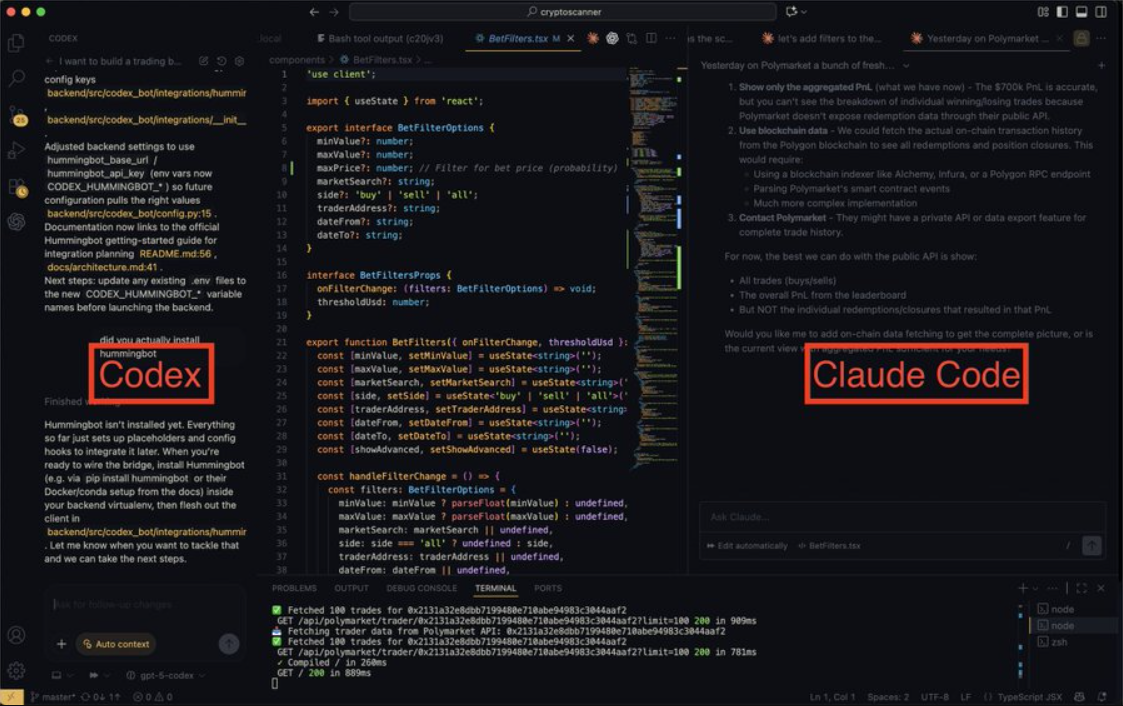
Image source: Medium
Windsurf — A High-Performance Contender for Agentic Coding
Windsurf, developed by the team behind Codeium, has quickly emerged as a formidable rival to Cursor. It focuses on a concept called "Flow," aiming to keep the developer in a state of continuous productivity without the friction of constant prompting.
How the Cascade Agent Handles Complex Tasks
The "Cascade" agent in Windsurf is notably innovative. Unlike traditional chat interfaces, Cascade is deeply integrated into the editor's "acting" layer. It can proactively suggest terminal commands, create new files, and even predict your next edit. Many developers find that Windsurf feels "snappier" for pure autocomplete tasks, as it uses a highly optimized inference engine that minimizes latency.
Comparing Responsiveness Between Windsurf and Cursor
In side-by-side testing, Windsurf often wins on UI responsiveness. While Cursor provides a more comprehensive "project management" feel, Windsurf excels at the "tab-tab-tab" workflow where the AI completes your thoughts in real-time. According to reviews on Medium, Windsurf’s ability to handle context without manual @ references makes it a popular choice for those who prefer a less "chatty" AI experience.
Evaluating GitHub Copilot for Enterprise Reliability in 2026
Despite the rise of specialized IDEs, GitHub Copilot remains a staple in the enterprise world. Its primary strength is its integration with the broader GitHub ecosystem, including Copilot Workspace and advanced security features.
However, Copilot has faced criticism from power users for being "lazy" in its agent mode. Some developers report that it takes instructions too literally or fails to account for project-wide architectural patterns as effectively as Cursor. Despite this, for organizations that prioritize security, SOC2 compliance, and a familiar environment, Copilot is widely regarded as the safest and most reliable choice. It provides a "middle ground" that enhances productivity without the unpredictability sometimes found in more aggressive agentic tools.
Many professional developers now use a "dual-tool" strategy. They use GitHub Copilot for daily autocomplete and small fixes, but switch to a dedicated agent like Claude Code or Cursor's Composer for complex architectural refactors or deep debugging sessions.
Specialized AI Editors for Performance and Web Applications
Not every developer needs a general-purpose IDE. In 2026, we see the rise of editors tailored for specific languages or deployment targets.
Zed — A Fast Editor for Rust Developers
Zed is built in Rust and utilizes GPU acceleration to render its UI. This results in a level of performance that few competitors match. While its AI features were initially more limited than Cursor's, Zed now supports a wide array of LLMs and features a unique "Channels" system for real-time collaborative AI coding. It is an excellent choice for systems programmers who find Electron-based editors (like VS Code and Cursor) too sluggish.
Playcode — Rapid Web Prototyping for Modern Frameworks
For web developers, Playcode offers a unique browser-based experience. It is specifically optimized for React, Vue, and Next.js. You can prompt a full UI component, and Playcode will generate the code, install the necessary NPM packages, and provide a live preview URL in seconds. It stands out as a top choice for rapid prototyping and "vibe coding" where speed of visual feedback is paramount.
IBM Bob — Enterprise Solutions for Regulated Industries
In highly regulated sectors like Fintech or Government, standard AI tools often fail to meet strict data residency and governance requirements. IBM Bob is designed specifically for these environments, offering enterprise-grade security and integration with IBM’s hybrid cloud ecosystem. It provides a governed environment where AI suggestions are checked against internal compliance standards before being presented to the developer.
Power-User Workflows Beyond Simple Autocomplete
To get the most out of an AI code editor in 2026, you must move beyond simple chat. Power users are now leveraging advanced protocols to give their AI "eyes and hands."
Implementing Model Context Protocol for Visual Feedback
The Model Context Protocol (MCP) allows you to connect your IDE to external tools. For example, you can connect an MCP server running Playwright (a browser automation tool). When the AI writes a piece of CSS or a new React component, it can actually "open" a hidden browser, take a screenshot, and verify that the UI looks correct. If the button is misaligned, the AI sees the visual error and fixes it without human intervention.
Configuring Sub-Agents for Domain-Specific Code Reviews
Modern editors allow you to set "Custom Instructions" or "System Prompts." Advanced developers use this to create specialized sub-agents. You might configure a "Security Auditor" agent that specifically looks for SQL injection vulnerabilities, or a "Performance Critic" that flags inefficient O(n^2) loops in your Python code. By siloing these concerns, you improve the reliability of the AI's output.
- Connect MCP servers for real-time API documentation access.
- Use "Project Rules" files (like
.cursorrules) to enforce coding standards. - Leverage terminal-access agents to automate test suite execution.
- Integrate visual debugging agents for frontend verification.
Top Free and Open Source AI Code Editors
If you are concerned about subscription fatigue or data privacy, the open-source community has provided several remarkable alternatives.
OpenCode — A Strong Free Alternative for Local Models
OpenCode is a rising star for developers who want to run everything locally. By connecting OpenCode to a tool like Ollama, you can use models like DeepSeek V4 or Llama 3 without your code ever leaving your machine. This is a top-tier option for developers working on sensitive intellectual property or those who want a completely free, unlimited AI experience.
Codeium — A Robust Free Tier for Individual Developers
While Codeium offers the premium Windsurf editor, their standard extension remains one of the most generous free offerings on the market. It provides high-quality autocomplete and chat for individual developers at no cost, making it a popular choice for students and hobbyists who aren't ready to commit to a $20/month subscription.
Managing Privacy and Security with Local LLMs
A common concern with AI editors is: "Is my code being used to train the next model?" For many enterprises, this is a deal-breaker. To mitigate this, many editors now offer "Privacy Mode" or "Zero Data Retention" (ZDR) policies.
- Local Inference
- Using tools like Cline or Aider with local models ensures that no data is transmitted over the internet. This is the most secure method but requires a powerful GPU (e.g., NVIDIA RTX 4090 or Apple M3 Max).
- Enterprise ZDR
- Services like Tabnine and GitHub Copilot for Business offer contracts that explicitly forbid the use of customer code for training. Always check the "Data Privacy" tab in your editor settings to ensure these features are active.
- Bring Your Own Key (BYOK)
- Editors that allow you to use your own OpenAI or Anthropic API keys give you more control over your data and often result in lower costs for low-volume users.
Comparing Vibe Coding and AI-Assisted Logic
The term "Vibe Coding" has become popular in 2026 to describe a workflow where the developer focuses on high-level intent and "vibes" rather than syntax. While this is highly impactful for building MVPs and simple web apps, it has limitations for complex systems.
The most successful developers in 2026 are those who strike a balance. They use the AI to handle the "how" (syntax, boilerplate, unit tests) while they focus on the "why" (architecture, business logic, user experience). Relying entirely on an agent to "prompt an app into existence" often leads to technical debt that is difficult to fix later. Instead, treat the AI as a highly capable pair programmer that requires clear, logical guidance.
Key Takeaways for Choosing Your AI Editor
- Cursor is widely regarded as one of the best all-around choices for those moving from VS Code who need deep codebase awareness.
- Windsurf stands out for developers who prioritize a fast, fluid "Flow" state with proactive agentic assistance.
- Zed offers a high standard of performance for systems programmers who need a lightweight, GPU-accelerated environment.
- GitHub Copilot remains a top-rated choice for enterprise teams requiring maximum stability and ecosystem integration.
- Local LLMs via OpenCode or Cline are the preferred route for developers with strict privacy requirements.
- MCP Support is the "next frontier," allowing AI agents to interact with browsers, databases, and external APIs.
- Vibe Coding is excellent for prototyping, but architectural oversight remains essential for maintainable software.
Start by downloading the free tier of Cursor or Windsurf to experience codebase-aware indexing firsthand before committing to a paid plan.
Frequently Asked Questions
What is the best AI code editor for beginners in 2026?
For beginners, Cursor or Playcode are highly recommended. Cursor is excellent because it feels exactly like VS Code but provides "Composer" mode, which can explain complex bugs in plain English. Playcode is a top choice for web development beginners because it handles all the environment setup (NPM, hosting, compilers) in the browser, allowing you to focus entirely on learning logic and UI design through prompting.
Is there a completely free AI code editor that is actually good?
Yes, OpenCode is a strong free alternative, especially when paired with local models like DeepSeek. Additionally, Codeium offers a very robust free tier for individuals that includes high-quality autocomplete and chat. While these may lack some of the "agentic" multi-file editing features found in Cursor's Pro plan, they are more than sufficient for most personal projects and learning.
Can I use Claude 3.5 Sonnet inside VS Code?
Absolutely. While VS Code doesn't have Claude built-in natively, you can use extensions like Cline, Aider, or GitHub Copilot (which now allows you to select different models). Using Claude 3.5 Sonnet is often preferred by developers for debugging and architectural reasoning, as it consistently ranks among the top-performing models for coding logic in 2026 benchmarks.
Does using an AI code editor make you a worse programmer?
This is a common debate. While AI can lead to "lazy" habits if you blindly accept every suggestion, it can also be a powerful learning tool. By using the AI to explain complex snippets or suggest more idiomatic ways to write a function, you can actually accelerate your learning. the key is to remain the "architect" — always review the code, run the tests, and understand the logic before merging.
How do I switch from VS Code to Cursor without losing my settings?
The migration is very simple. When you first install Cursor, it will ask if you want to import your VS Code extensions, keybindings, and themes. Since Cursor is a fork of VS Code, almost everything is compatible. You can literally pick up exactly where you left off, but with the added benefit of integrated AI features like the terminal agent and codebase indexing.