Google AI Mode vs Perplexity — Which AI Search Tool Should You Actually Use?
Choosing between Google AI Mode and Perplexity depends entirely on your intent. Perplexity stands out as a top choice for structured, citation-heavy research and academic deep dives. Google AI Mode ranks among the top options for users deeply embedded in the Google ecosystem who need to find specific resources like schedules, local businesses, or integrated Workspace data.
The Verdict: Use Perplexity for learning complex topics; use Google for finding specific links and managing daily tasks.
The landscape of information retrieval has shifted dramatically. We are no longer just "searching for links"; we are "asking for answers." This evolution has brought two titans to the forefront: Google, the incumbent search giant now integrating AI Overviews, and Perplexity, the dedicated "answer engine" that has rapidly become a favorite among researchers and power users.
As of late 2026, the distinction between these tools has become more pronounced. While both utilize large language models (LLMs) to synthesize information, their underlying architectures and philosophies offer vastly different experiences. This comparison explores the technical nuances, user experience, and real-world accuracy of both platforms to help you decide which belongs in your daily workflow.
Image source: Cashify
How Google AI Mode and Perplexity Differ at Their Core
Perplexity as a Dedicated Answer Engine
Perplexity was built from the ground up as a conversational interface. Unlike traditional search engines that prioritize a list of websites, Perplexity prioritizes the synthesis of those websites. Its architecture is "conversational first," meaning it treats every query as the start of a dialogue. One of its most significant advancements is the way it handles inline citations. Instead of burying sources at the bottom, Perplexity places numbered citations directly next to the claims it makes, allowing for immediate verification.
According to PCMag, this focus on transparency makes it a highly recommended tool for those who value source integrity. It doesn't just give you an answer; it shows you the "receipts" for that answer in real-time.
Google AI Mode as an Integrated Search Layer
Google AI Mode (often referred to as AI Overviews or Gemini Search) is a different beast entirely. It is a sophisticated AI layer retrofitted onto the world's largest and most comprehensive search index. Google’s approach is one of "query expansion." When you ask a question, Google doesn't just look for the answer; it looks for related angles, entities, and resources you might not have explicitly requested.
This integration allows Google to leverage its massive database of real-time information—such as flight schedules, restaurant bookings, and local maps—in a way that few competitors match. However, because it is built on top of a legacy search engine, it often feels like a hybrid experience rather than a pure AI conversation.
Which Tool Provides Deeper Research Results?
The Power of Perplexity Deep Research
For those who need to go beyond a surface-level summary, Perplexity’s "Deep Research" mode is a significant step forward. This feature doesn't just perform one search; it executes dozens of searches, evaluates hundreds of sources, and takes between 2 to 4 minutes to synthesize a comprehensive report. According to research from ClickUp, Perplexity Pro users are granted up to 500 of these deep research queries per day, making it a powerhouse for academic or professional investigations.
Deep Research is particularly effective at mapping complex topics where information is scattered across various white papers, news articles, and forums. It acts as a digital research assistant that reads the web for you, providing a structured output that often includes tables and itemized data.
Google AI Mode and the Query Expansion Edge
Google’s strength lies in what some call the "Rabbit Hole" advantage. Because Google understands the relationship between entities (e.g., an actor, their movies, and the theaters showing those movies), it excels at meandering discovery. If you start by searching for a historical figure, Google AI Mode will naturally surface related events, contemporaries, and even modern-day locations associated with that person.
While it may not produce a 2,000-word research report as cohesively as Perplexity, Google is exceptionally strong at providing a breadth of related information that helps users discover angles they hadn't considered. It is a tool for exploration as much as it is for answering.
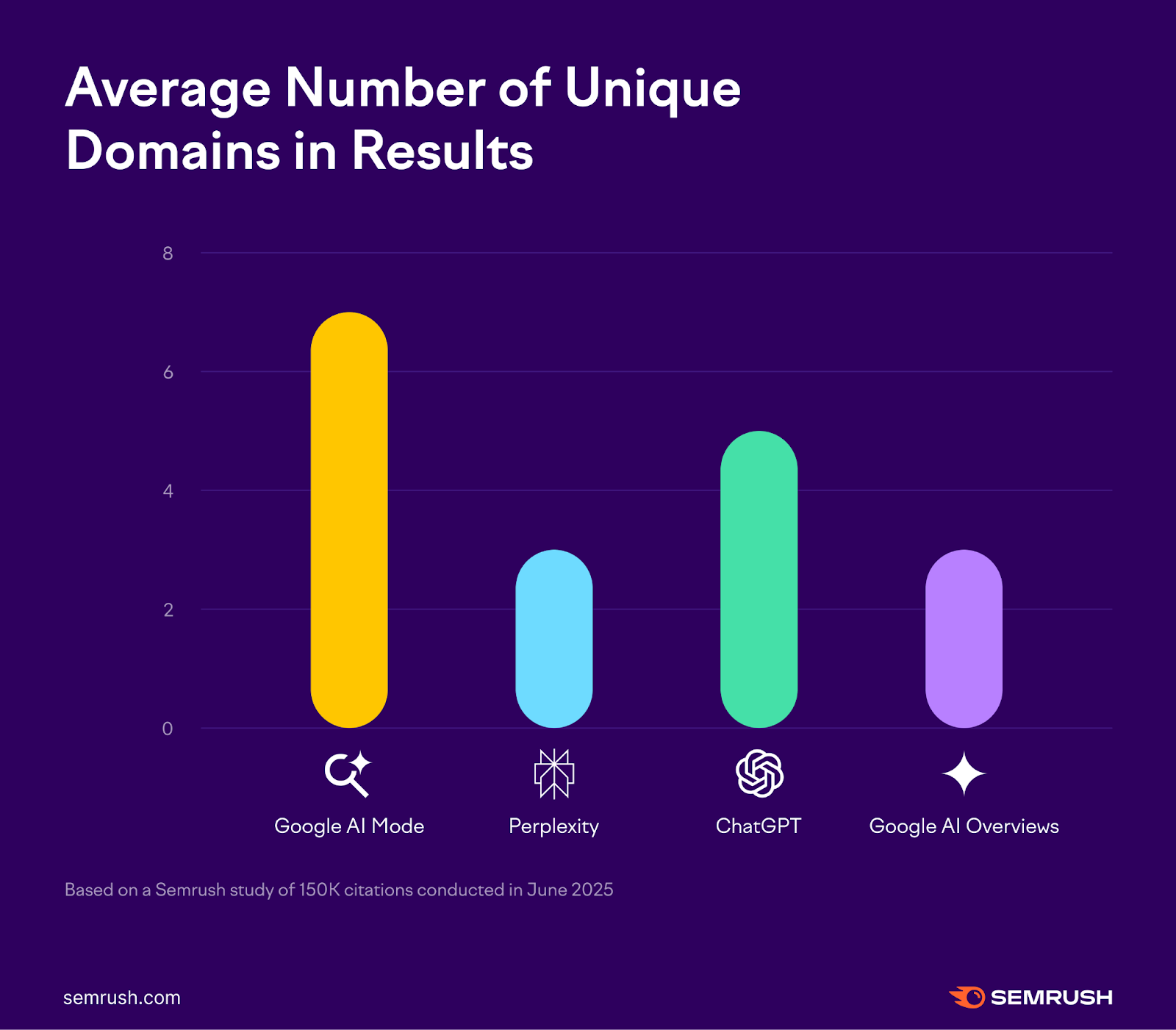
Image source: Semrush
Comparing the User Experience and Visual Layout
Why Perplexity Wins on Structured Data
One of the most frequent praises for Perplexity is its clean, data-driven layout. When you ask for a budget comparison or a travel itinerary, Perplexity often responds with neatly formatted tables, maps, and itemized lists. This reduces the cognitive load on the user, making the information easy to digest at a glance. The UI feels purpose-built for productivity, avoiding the clutter that often plagues traditional search results.
The Problem with Google AI Text Walls
In contrast, Google AI Mode has faced criticism for its presentation, particularly on mobile devices. Users often report encountering "dense, off-putting" blocks of text that require significant scrolling to navigate. Furthermore, Google’s business model introduces what some call the "Salesperson Problem." Even when you are in the early research phase of a topic, Google AI Overviews may clutter the results with shopping links and sponsored content, which can be distracting for those seeking purely informational data.
Regardless of which tool you choose, always follow the Verification Rule: For high-stakes research (medical, legal, or financial), you must click through to the primary source. AI tools are excellent for summarization, but they can occasionally misinterpret the context of a specific data point.
How Each Tool Handles Sources and Citations
Granular Control with Perplexity Focus Modes
Perplexity offers a level of source control that Google currently lacks. Through its "Focus Modes," users can restrict the AI to search only specific types of content:
- Academic: Searches peer-reviewed journals and scholarly articles.
- Reddit: Focuses on community discussions and anecdotal evidence.
- YouTube: Transcribes and summarizes video content.
- Writing: Operates as a pure LLM without searching the web.
This granularity allows researchers to tune the "vibe" of their results, ensuring they are getting information from the right kind of sources for their specific needs.
Transparency and Verification Rules
Google’s approach to citations is more visual but less granular. It uses "link cards" that appear alongside or below the AI summary. While these are easy to click, they don't always correspond directly to specific sentences in the text, making it harder to verify individual claims quickly. Perplexity’s inline numbered system remains a top-rated feature for those who require rigorous fact-checking.
The Battle of Ecosystems and Workflows
Google Workspace Integration for Professionals
For many, the choice isn't just about the AI—it's about where their work lives. Google AI Mode has a massive advantage for users already paying for Google One or using Google Workspace. The ability to export an AI-generated summary directly to a Google Doc, or to ask Gemini to find information buried in your Gmail or Drive, creates a seamless workflow that Perplexity cannot currently match.
Perplexity Spaces and the Comet Browser
Perplexity is fighting back by building its own ecosystem. "Spaces" allow for collaborative research, where multiple users can contribute to a single thread and organize sources together. Additionally, the introduction of "Comet," an AI-driven browser, suggests that Perplexity wants to be more than just a search engine—it wants to be the interface through which you interact with the entire web.
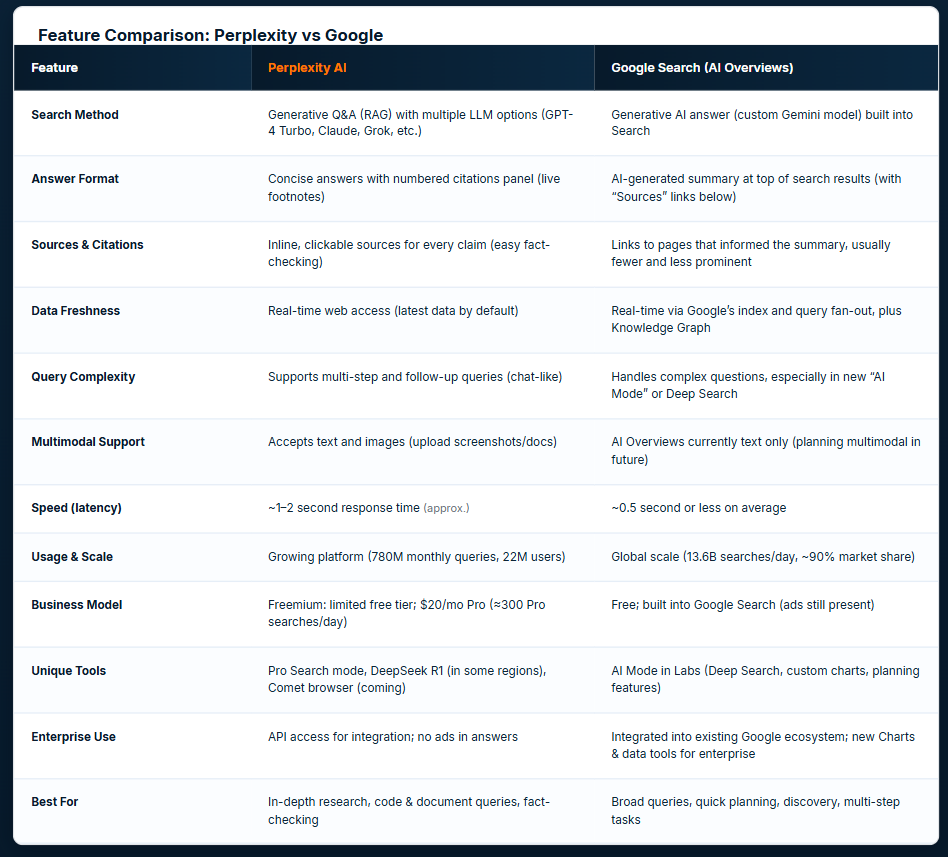
Image source: Index.dev
Real-World Accuracy and the Logic Test
Where Google AI Mode Often Fails
Despite its vast resources, Google AI Mode has shown weaknesses in basic logic tests. For example, when asked for "budget phone recommendations," Google has been known to suggest outdated or refurbished models as if they were current releases, failing to account for the nuances of the current market. As noted by Android Authority, the AI sometimes struggles to distinguish between a "good deal" and an "obsolete product."
The Context Engineering Issue in Perplexity
Perplexity is not without its flaws. Some power users on developer forums have suggested that Perplexity’s "context engineering"—the way it wraps your query in additional instructions—can sometimes cripple high-end models like Claude 3.5 Sonnet. This can lead to issues with niche coding scripts where the raw model might have performed better. While Perplexity is a popular choice for "how-to" guides, it can occasionally struggle with highly complex, multi-step logic that requires deep reasoning rather than just information retrieval.
Which Subscription Offers Better Value for Your Money?
| Feature | Perplexity Pro ($20/mo) | Gemini Advanced ($20/mo) |
|---|---|---|
| Model Choice | GPT-4o, Claude 3.5, Sonar | Gemini 1.5 Pro |
| Deep Research | 500 queries per day | Integrated AI Overviews |
| Ecosystem Perks | Perplexity Spaces, Comet | 2TB Storage, Workspace Integration |
| Source Filtering | Advanced (Academic, Reddit, etc.) | Basic (Web-wide) |
The Flexibility of Perplexity Pro
Perplexity Pro is widely regarded as one of the best values for AI enthusiasts because it allows you to switch between different state-of-the-art models. If you find that GPT-4o isn't giving you the tone you want, you can switch to Claude 3.5 with a single click. This flexibility is a major selling point for users who want the "best of all worlds" in a single interface.
The All-in-One Value of Google One AI Premium
Google’s subscription is more of a lifestyle bundle. For the same $20, you get the most advanced Gemini model, but you also get 2TB of cloud storage and AI features integrated into your phone and office suite. For the average consumer, this "all-in-one" approach often provides more tangible daily value than a standalone research tool.
The Final Verdict for Different Types of Users
Choose Perplexity If You Are a Student or Researcher
If your primary goal is to learn, cite, and organize information, Perplexity is a top-tier option. Its Focus Modes and Deep Research capabilities make it a significant advancement over traditional search for anyone writing a thesis, a white paper, or a detailed blog post. It prioritizes the accuracy of the answer over the convenience of the link.
Choose Google AI Mode If You Are a Casual Searcher
If you need to know what time a movie starts, how to get to the nearest pharmacy, or want to summarize an email thread in your inbox, Google AI Mode is a strong contender. Its integration with real-world data and the Google ecosystem makes it a highly impactful tool for daily life and resource retrieval.
The Power User Choice
For those who demand total privacy and control, some community members suggest that neither tool is perfect. Power users often look toward local LLM setups combined with tools like SearXNG to avoid the "context engineering" and data tracking inherent in commercial platforms. However, for 99% of users, the choice between Google and Perplexity will define their digital experience in 2026.
Key Takeaways for Choosing Your AI Search Tool
- Prioritize Citations: Use Perplexity if you need to verify every claim with inline, numbered sources.
- Leverage Ecosystems: Choose Google if you want your search results to live inside Docs, Gmail, and Drive.
- Deep Research Needs: Perplexity’s 500-query daily limit for Deep Research is a major improvement for heavy users.
- Real-Time Resources: Google remains a leading choice for live data like showtimes, flight status, and local business info.
- Model Flexibility: Perplexity Pro allows you to toggle between GPT-4o and Claude, offering a more customizable experience.
- Avoid Clutter: If you find Google's shopping links and "text walls" distracting, Perplexity’s clean UI will be a breath of fresh air.
Start by testing both tools with a complex query today to see which synthesis style matches your personal way of thinking.
Frequently Asked Questions
Is Google AI Mode the same as Gemini?
Not exactly. Gemini is the underlying large language model (LLM) developed by Google. AI Mode (or AI Overviews) is the specific feature within Google Search that uses Gemini to generate summaries and answers. You can use Gemini as a standalone chatbot, but AI Mode is the integrated experience you see when performing a standard Google search.
Does Perplexity use Google’s search index?
Perplexity uses a variety of search indexes to gather information, including Bing and Google, along with its own internal web crawlers. However, it processes this data differently than a traditional search engine, focusing on extracting and synthesizing the most relevant text rather than just ranking pages by authority.
Can Google AI Mode filter for academic sources?
Currently, Google AI Mode lacks the granular "Focus Modes" found in Perplexity. While you can add "site:.edu" or "scholarly" to your query, Google does not have a dedicated toggle to restrict its AI summaries exclusively to peer-reviewed journals in the same way Perplexity’s Academic mode does.
Which is better for coding and technical tasks?
Perplexity is widely regarded as a popular choice for "how-to" coding guides because it can pull from recent documentation and Stack Overflow threads. However, for writing complex, functional scripts from scratch, many developers still prefer using raw models like Claude 3.5 Sonnet directly, as the "context engineering" in search-based AI can sometimes introduce errors.
Is Perplexity Pro worth $20 a month?
For power users, students, and professional researchers, the answer is generally yes. The $20 subscription provides 500 Deep Research queries per day and the ability to switch between top-tier models like GPT-4o and Claude. If you only perform casual searches, the free version or Google’s standard AI features may be sufficient.
Disclaimer: All trademarks and copyrighted content referenced in this article belong to their respective owners. Brief excerpts and data points are used under fair use for purposes of commentary and informational reporting. This article is not affiliated with or endorsed by Google or Perplexity AI.