
How Much Does a Gemini Pro Subscription Cost and Is It Worth It?
As of 2026, a Google AI Pro subscription costs $19.99 per month. This flagship tier provides access to the Gemini 3.1 Pro model, 5TB of Google One cloud storage, integration into Google Workspace (Gmail, Docs), and a YouTube Premium Lite bundle. For developers, it also unlocks the Google Antigravity coding environment and includes a $10 monthly Google Cloud credit.
The landscape of artificial intelligence subscriptions has evolved significantly. Following the 2026 rebranding from "Gemini Advanced" to the unified "Google AI" ecosystem, users are now presented with a structured, four-tier pricing model. Navigating these options requires understanding not just the monthly cost, but the specific storage limits, model access, and developer tools included in each package.
Whether you are a casual user looking to draft emails faster, a student managing large research datasets, or a professional developer utilizing asynchronous coding agents, choosing the right tier is essential for maximizing your return on investment. This article breaks down the exact costs, features, and hidden limitations of the Gemini Pro subscription to help you determine if it aligns with your workflow.
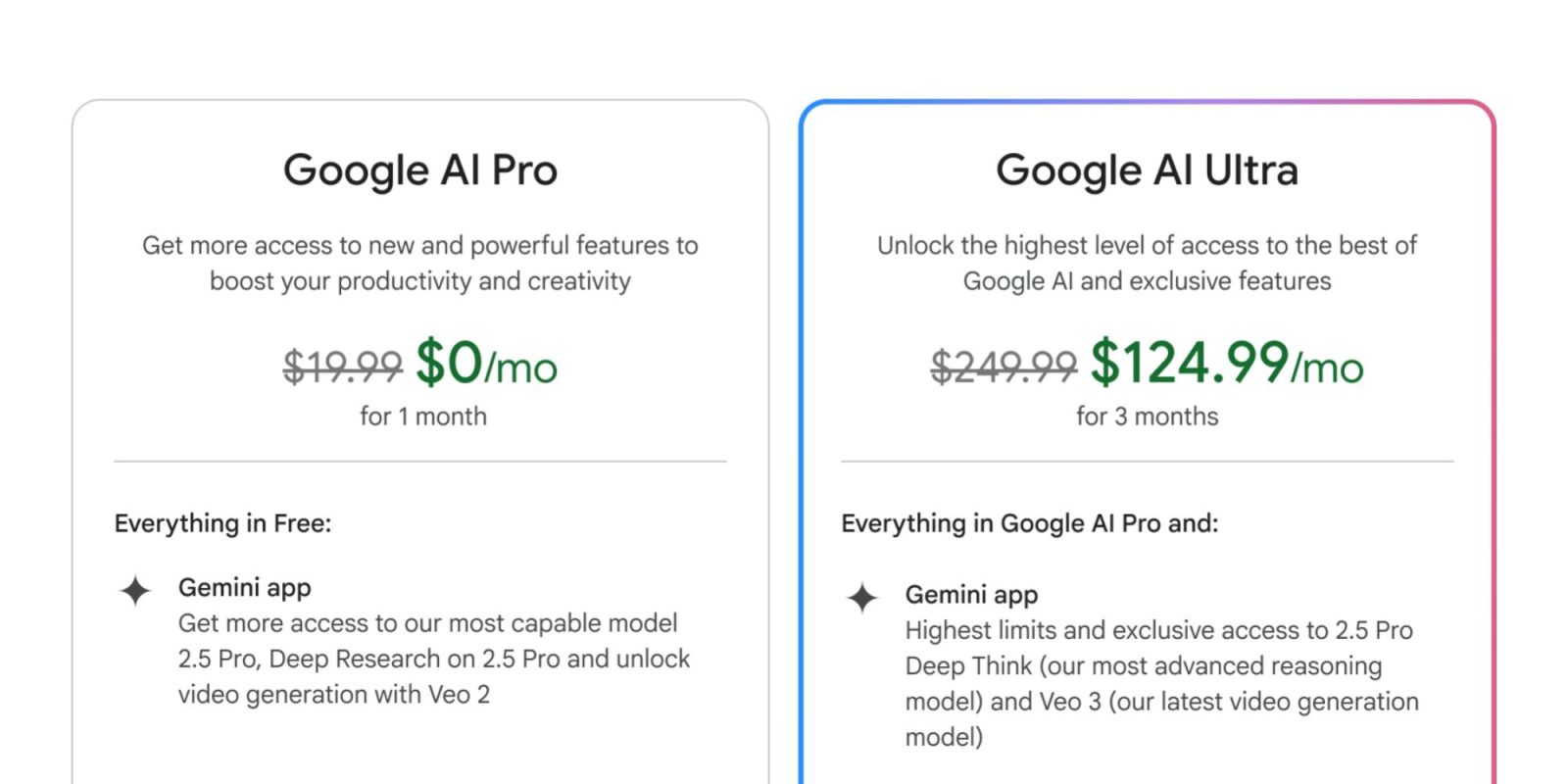
Image source: 9to5Google
What Are the Different Google Gemini Subscription Tiers?
To understand the value of the Pro tier, it is helpful to see where it sits within Google's broader ecosystem. As detailed on the official Google AI subscription page, the 2026 lineup consists of four distinct levels designed to scale with user needs.
AI Free
The baseline experience for casual users.
- Gemini 3.5 Flash model
- 15GB standard storage
- Basic web and mobile access
- Standard usage limits
AI Plus
An entry-level upgrade for light power users.
- Gemini 3.5 Flash model
- 400GB cloud storage
- Priority response times
- 2x higher usage limits
AI Pro
The flagship tier for professionals and creators.
- Gemini 3.1 Pro model
- 5TB cloud storage
- YouTube Premium Lite
- Developer tools access
AI Ultra
Enterprise-grade power for heavy data processing.
- Gemini Omni model
- 20TB+ cloud storage
- Full YouTube Premium
- Gemini Spark (Beta) agent
The introduction of the AI Plus tier at $4.99 was a direct response to users who needed more than 15GB of storage but could not justify a $20 monthly expense. However, the AI Pro tier remains the focal point of the lineup, bundling high-capacity storage with advanced reasoning capabilities.
How Much Does Each Gemini Plan Cost per Month?
The pricing structure is relatively straightforward, but there are regional nuances and billing options to consider. The standard AI Pro subscription is billed at $19.99 per month. Unlike some competitors, Google heavily integrates this cost with its Google One storage infrastructure.
According to Google One's AI plan documentation, users who already pay for 2TB or 5TB of standard Google One storage often receive prorated upgrades or a 2-month free trial when switching to the AI Pro tier. Annual billing options are occasionally offered during promotional periods, which can reduce the effective monthly cost by roughly 15%.
While the free version of Gemini is available to users 13 and older in many regions, purchasing a paid AI Pro or AI Ultra subscription requires the account holder to be strictly 18 years or older. This age verification is heavily enforced in the European Economic Area (EEA), the United Kingdom, and Switzerland due to local digital commerce and AI regulations.
It is also important to note the "AI Credits" system. Your $19.99 monthly fee covers a baseline quota of compute power. If you are running highly complex, automated coding tasks that exceed this quota, you will not be cut off immediately. Instead, you can purchase additional AI Credits directly through the Google One dashboard to maintain service continuity.
What Features Do You Get With a Gemini Pro Subscription?
Evaluating whether the $19.99 cost is justified requires a deep dive into the specific features unlocked at this tier. The value proposition extends far beyond a simple chat interface.
Access to Gemini 3.1 Pro and Model Switching
The core engine of the Pro subscription is the Gemini 3.1 Pro model. This architecture is specifically optimized for complex reasoning, advanced mathematics, and multi-step logic puzzles that the standard Flash model struggles with. Pro subscribers gain access to a manual "Model Dropdown" in the web and mobile interfaces. This allows users to toggle between Flash-Lite (for rapid, battery-efficient mobile queries) and Pro (for deep analysis).
Google Workspace Integration and the AI Inbox
For professionals embedded in the Google ecosystem, the Workspace integration is a major selling point. Gemini Pro operates directly inside Google Docs, Sheets, Slides, and Gmail. The 2026 "AI Inbox" feature is particularly notable; it can summarize long email threads, cross-reference your Google Calendar, and draft context-aware replies without requiring you to open a separate tab.
The YouTube Premium Lite Bundle
A frequent point of confusion among consumers is the YouTube perk included with AI subscriptions. The AI Pro tier includes YouTube Premium Lite. This provides an ad-free viewing experience on standard videos and allows for background play on mobile devices. However, it does not include full access to YouTube Music Premium or offline downloads. Full YouTube Premium is reserved exclusively for the AI Ultra tier.
Google Cloud Credits for Developers
To attract software engineers, Google includes a $10 monthly Google Cloud credit with the AI Pro subscription. This credit can be applied toward hosting, database management, or API usage within the Google Cloud Platform, effectively subsidizing the cost of the subscription for active developers.
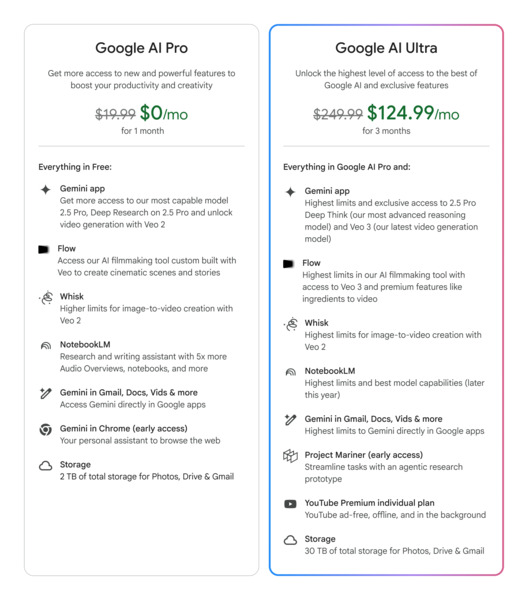
Image source: Android Central
Gemini Pro vs. Ultra — Which One Should You Choose?
For users who find the Pro tier insufficient, the AI Ultra tier presents a significant step up, albeit at a much higher price point ($99.99 to $199.99 per month, depending on storage needs). Deciding between the two comes down to usage limits and agentic capabilities.
| Feature | AI Pro ($19.99/mo) | AI Ultra ($99.99+/mo) |
|---|---|---|
| Primary Model | Gemini 3.1 Pro | Gemini Omni |
| Cloud Storage | 5TB | 20TB to 30TB |
| Usage Limits | 4x higher than Free tier | Up to 20x higher than Pro tier |
| YouTube Perk | Premium Lite | Full Premium Individual |
| Autonomous Agents | Jules (Coding) | Gemini Spark (Beta) - 24/7 Action Agent |
As highlighted during the Google I/O 2026 updates, the Ultra tier introduces Gemini Spark (Beta). This is a 24/7 autonomous agent capable of taking actions across the web on your behalf, such as booking flights or managing complex calendar scheduling while you are offline.
Who should choose Pro? Freelancers, students, content creators, and heavy Google One users who need 5TB of storage and robust text/code generation.
Who should choose Ultra? Professional data scientists, enterprise development teams, and users who require the massive context windows and multimodal processing of the Gemini Omni model.
How to Use Google Antigravity and Jules for Advanced Coding
One of the most significant additions to the AI Pro tier is access to Google's advanced developer environments: Antigravity and Jules. These tools elevate Gemini from a simple code-completion chatbot to a functional development partner.
Google Antigravity is an agent-first platform that allows Gemini to execute code directly within a secure, sandboxed terminal and browser environment. Instead of copying and pasting code snippets, developers can ask Antigravity to build a script, run it, debug the output, and iterate automatically.
Operating within Antigravity is Jules, an asynchronous coding agent. Jules is designed to work while you are away from your keyboard. A typical workflow looks like this:
- Initialize the Environment: Connect your GitHub repository to the Antigravity workspace.
- Prompt Jules: Instruct the agent with a complex task, such as: "Refactor the authentication module to use OAuth 2.0 and ensure all unit tests pass."
- Asynchronous Execution: You can close your browser. Jules will spend hours analyzing the codebase, writing the refactored code, running tests in the terminal, and fixing its own errors.
- Review the Daily Brief: The next morning, Jules provides a "Daily Brief" summarizing the changes made, highlighting any edge cases it could not resolve, and presenting a pull request for your approval.
This capability makes the Pro subscription highly competitive for software engineers looking to automate tedious refactoring or testing processes.
Understanding the AI Credits and Overage System
Heavy users of tools like Antigravity and Google Flow need to understand the 2026 "AI Credits" system. To prevent network abuse, Google implements a baseline compute quota for all Pro subscribers. For standard chatting and document drafting, it is highly unlikely you will ever hit this limit.
However, running asynchronous agents like Jules consumes significant compute resources. Once your baseline quota is exhausted, your tasks will pause unless you have configured your account for overages.
To ensure uninterrupted service, users can navigate to their Google One settings and enable the "Toggle for overage" option. This allows the system to automatically deduct from a pre-purchased balance of AI Credits. These credits can be bought in bulk via the Google One app, providing a flexible pay-as-you-go model for developers who experience temporary spikes in workload.
Can Students Get a Gemini Pro Subscription for Free?
The availability of discounted or free AI tools for students has been a topic of much discussion. In August 2025, Google officially discontinued the legacy "Gemini Education" add-ons for standard Workspace accounts. However, this does not mean students are entirely locked out.
In 2026, verified university students are eligible for a 1-year free trial of the AI Pro tier. This trial includes the 5TB of storage and access to the Gemini 3.1 Pro model, though it may exclude the Google Cloud developer credits.
Community forums frequently report issues with activating this trial. The most common problem occurs when students attempt to sign up using a personal `@gmail.com` address rather than their official `.edu` or institutional email. To successfully claim the trial, you must initiate the process through the Google One student portal and verify your enrollment status via the integrated third-party verification service (such as SheerID).
How to Manage or Cancel Your Gemini Subscription
If you decide that the AI Pro tier is not right for you, managing or cancelling the subscription is handled entirely through the Google One infrastructure, rather than the Gemini app itself. As outlined in the official support documentation, the process is straightforward:
- Navigate to the Google One website or open the Google One mobile app.
- Click on the Settings gear icon.
- Select Change membership plan.
- Choose the Cancel membership option or select a downgrade path (such as moving to the $4.99 AI Plus tier).
For enterprise users, the process is different. Workspace administrators must cancel the Gemini add-on subscription directly through the Google Admin Console under the "Billing" section.
What happens to your data if you cancel? If you downgrade from the Pro tier (5TB) to the Free tier (15GB) and your stored data exceeds 15GB, your account will enter a "Read-Only" grace period. You will not lose your files immediately, but you will be unable to upload new files, send/receive emails via Gmail, or back up photos until you clear enough space to fall below the 15GB limit.
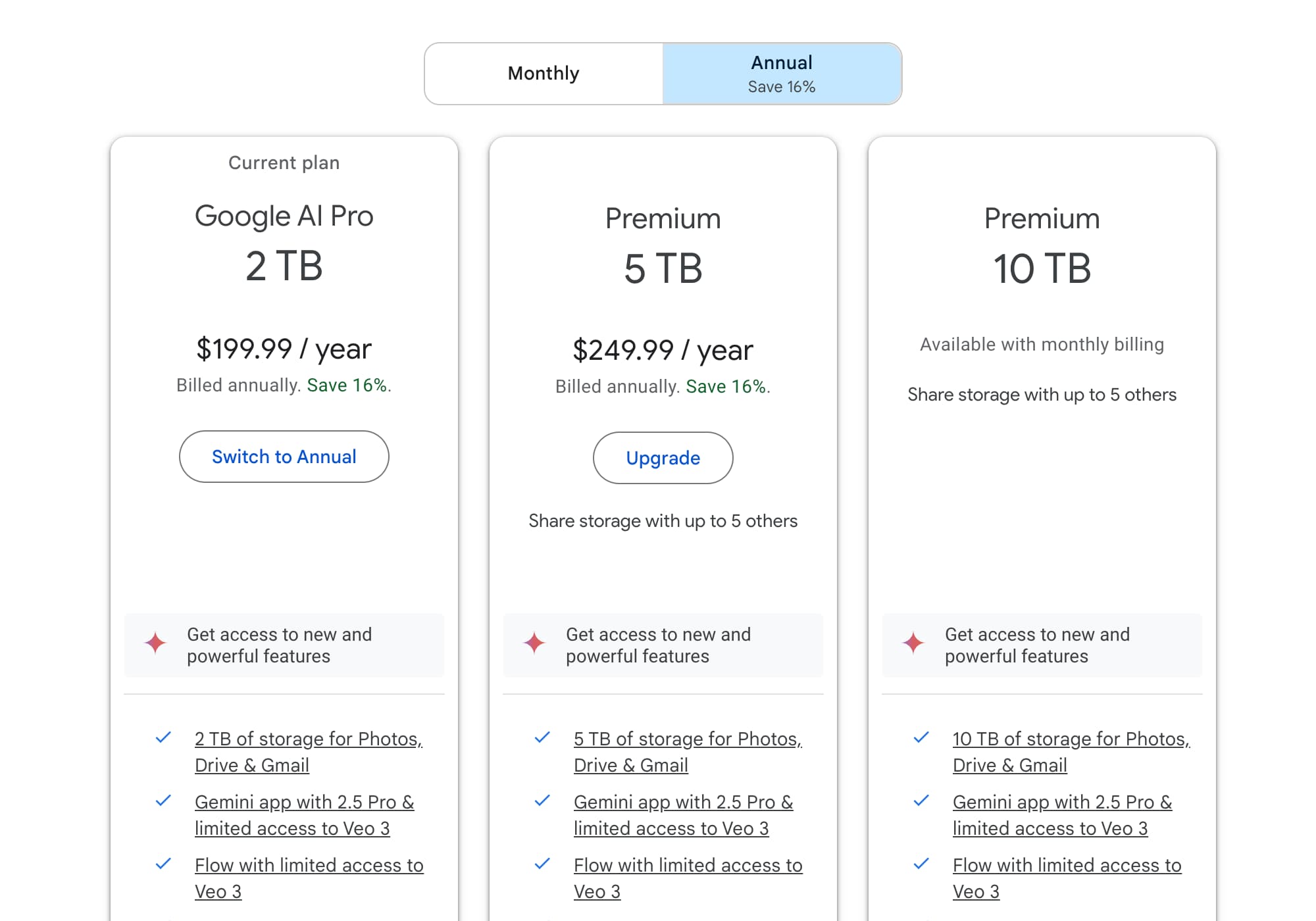
Image source: 9to5Google
Frequently Asked Questions
- Does Gemini Pro include 2TB or 5TB of storage?
- As of the 2026 pricing update, the standard Google AI Pro subscription includes 5TB of Google One cloud storage. The older 2TB allocation was phased out when the service transitioned from the "Gemini Advanced" branding.
- Can I share my Gemini Pro subscription with family members?
- Yes and no. While you can share the 5TB of Google One cloud storage with up to five family members via Google Family Link, the premium AI features (like access to Gemini 3.1 Pro and the AI Inbox) are restricted to the primary account holder only.
- What is the age limit for a Gemini Pro subscription?
- To purchase and use a paid AI Pro or Ultra plan, you must be at least 18 years old. This is strictly enforced in the European Economic Area (EEA), the UK, and Switzerland. The free version of Gemini remains available to users 13 and older in most regions.
- How do I buy more AI Credits?
- If you exhaust your baseline compute quota (typically only an issue for developers using asynchronous agents), you can purchase additional AI Credits directly through the Google One dashboard under the "AI Usage & Quotas" settings tab.
- Does Gemini Pro work directly inside Gmail?
- Yes. The Pro subscription unlocks the "AI Inbox" feature within Gmail. This allows the AI to summarize long email threads, draft context-aware replies, and reference your Google Calendar without requiring you to open a separate application.
Final Thoughts
Determining whether the Google AI Pro subscription is worth the $19.99 monthly fee depends heavily on how deeply you are integrated into the Google ecosystem. While some casual users on community forums have likened paying for AI to "paying for tap water," this perspective ignores the substantial utility bundled into the 2026 tiers.
- The 5TB storage inclusion alone justifies a significant portion of the cost for users managing large photo libraries or drive files.
- YouTube Premium Lite adds tangible daily value by removing ads from standard video content.
- Workspace integration saves measurable time for professionals drafting emails and analyzing spreadsheets.
- Jules and Antigravity provide exceptionally strong capabilities for developers looking to automate code refactoring.
- The 1-year student trial remains a highly accessible entry point for verified university enrollees.
