How to Find a Top Free AI Summarizer Without Hidden Word Limits
If you are frustrated by "free" tools that demand a credit card after pasting 600 words, you need a tool tailored to your specific file size and format. Based on current testing, Scribbr and ZeroGPT stand out as top choices for truly unlimited text pasting without signups. For academic PDFs, Scholarcy is highly recommended for its reference extraction, while Gemini 1.5 Pro offers an exceptionally strong context window for summarizing entire books or massive documents for free.
The landscape of artificial intelligence has shifted dramatically. Just a few years ago, condensing a 50-page report required hours of manual reading. Today, a simple search for a "summarizer ai free" yields thousands of results. However, users quickly discover a frustrating reality: the vast majority of these tools are heavily restricted freemium products designed to hit you with a paywall exactly when you need them most.
Understanding how these tools operate is the first step to bypassing their limitations. Modern AI summarization generally falls into two categories:
- Extractive Summarization
- The AI scans the document, identifies the most statistically significant sentences, and pulls them out verbatim. It acts like a digital highlighter. This method is fast and preserves the original author's exact phrasing, but it can sometimes result in a choppy, disjointed reading experience.
- Abstractive Summarization
- The AI reads the entire text, comprehends the core concepts, and generates a completely new summary in its own words—much like a human assistant would. This is powered by Large Language Models (LLMs) and generally produces a much smoother, more natural summary.
The challenge is that abstractive summarization requires significant computational power. To manage server costs, many companies impose strict word limits on their free tiers. This guide will help you navigate around those hidden limits, matching your specific workflow—whether you are processing academic PDFs, YouTube videos, or sensitive corporate documents—with a tool that actually delivers on the promise of being free.
Which Free AI Summarizer Actually Fits Your Specific Workflow?
A generic text box is rarely sufficient for specialized tasks. The tool you choose should align with the format of your source material and your ultimate goal for the summary. Below is a breakdown of top-tier options categorized by specific user needs.
Top Options for Unlimited Text and No Signups
If your primary goal is to paste a long article or essay and get an immediate summary without creating an account, friction is your enemy. Many popular tools require email verification before processing a single word.
For a seamless experience, Scribbr ranks among the top choices. It is widely regarded as a highly reliable option because it currently offers 100% free summarization with no stated word caps and no mandatory account creation. Users can paste text, select between paragraph or bullet-point outputs, and adjust the length slider instantly.
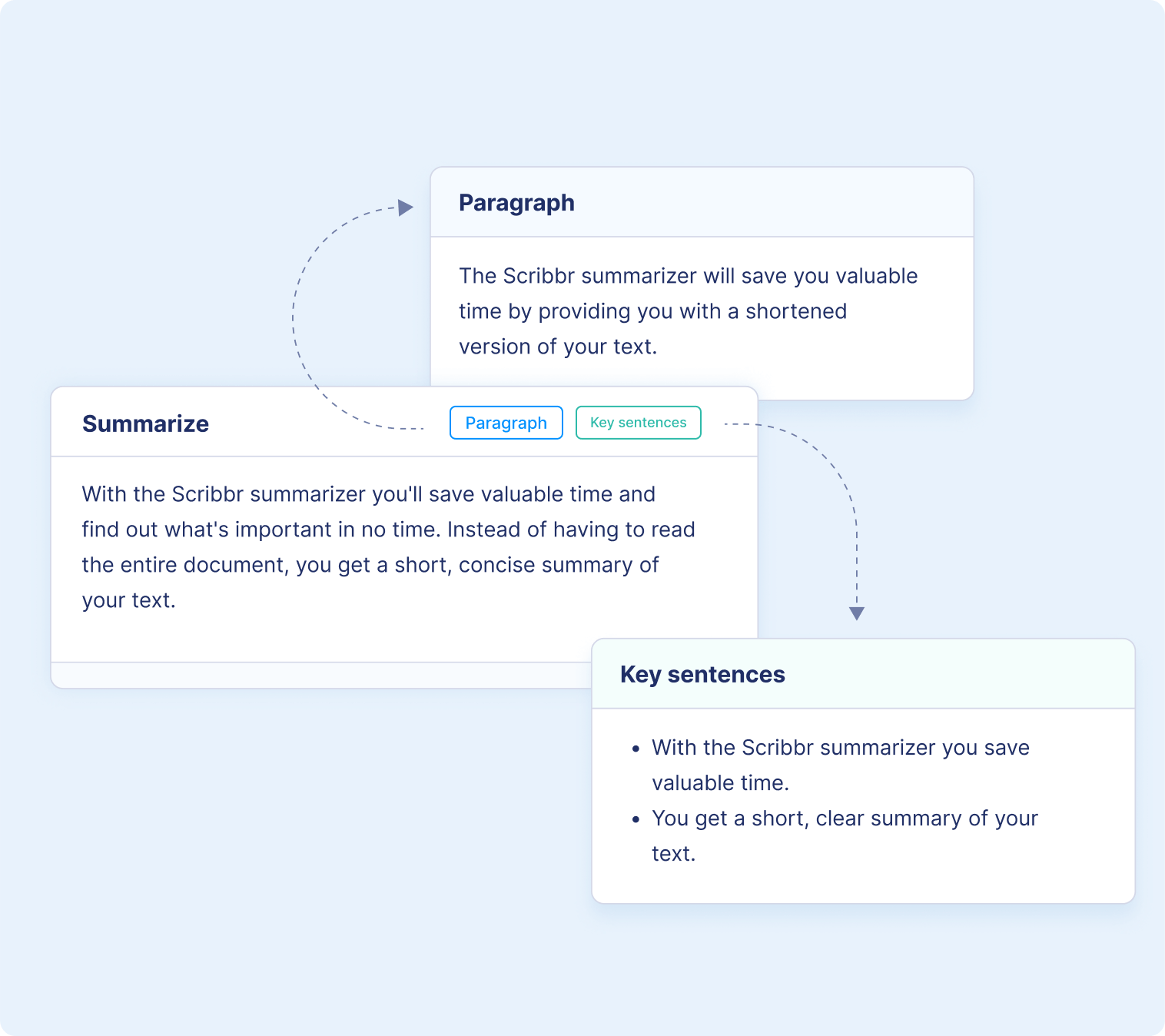
Image source: Scribbr
Similarly, ZeroGPT offers a robust free summarizer that handles multiple languages and large text blocks without forcing users through a registration funnel. Both tools utilize abstractive models to ensure the resulting text flows naturally, making them excellent choices for general web reading and quick email comprehension.
Standout Choices for Academic Research and Literature Reviews
Students and researchers face a unique problem: academic papers are dense, heavily formatted, and filled with citations that confuse basic AI tools. Pasting a PDF into a standard web summarizer often results in a garbled mess of broken sentences and misplaced footnotes.
For this specific workflow, Scholarcy is an exceptionally strong tool. Designed specifically for academic literature, it acts as a "Robo-Highlighter." Instead of just providing a generic paragraph, Scholarcy breaks down research papers into structured, interactive flashcards. It identifies the core thesis, the methodology used, the main findings, and the limitations of the study.
Furthermore, Scholarcy integrates directly with reference management software like Zotero. It can extract the bibliography from a PDF and allow you to export the summarized data into an Excel literature matrix, saving researchers countless hours during the literature review process.
Strong Tools for Visual Learners and Logical Mapping
Not everyone processes information best through blocks of text. For visual learners, neurodivergent individuals, or professionals trying to map out complex project proposals, a standard bulleted list might not be enough.
Decopy AI offers a notable feature set for this demographic. Beyond standard text output, it features a "Mind Map" mode. When you input a complex article, the AI analyzes the logical connections between different concepts and generates a visual web of ideas. This allows users to see how sub-topics branch off from the main thesis.
Additionally, Decopy includes an "FAQ Mode." Rather than summarizing the text chronologically, it reads the document and generates a list of the most important questions the text answers, followed by concise responses. This is highly effective for studying or preparing for meetings.
Reliable Methods for Summarizing Long YouTube Videos and Meetings
Video and audio summarization presents a different technical hurdle. Most free AI tools do not actually "watch" or "listen" to the video. Instead, they rely on the availability of a text transcript or closed captions.
If a YouTube video has auto-generated captions, tools like Decopy AI and various browser extensions can pull that transcript and summarize it. However, auto-generated captions often lack punctuation, which can confuse basic AI models.
For a more integrated workflow, community forums frequently recommend browser extensions like Glasp. Glasp not only summarizes YouTube videos by processing the transcript, but it also adds a social highlighting layer. Users can highlight specific timestamps in a video, take notes, and see what other users found most valuable in the same content. This collaborative approach makes it a strong contender for students sharing lecture notes.
Comparing the Hidden Limits of Popular Free AI Tools
The term "free" is heavily utilized in search engine marketing, but it rarely means "unlimited." Companies must pay for the server compute time required to run Large Language Models. To balance this, they employ freemium models. Understanding these limits before you begin your work will save you from mid-task interruptions.
Below is a transparent comparison of popular tools, highlighting the restrictions you will encounter on their free tiers.
| Tool Name | Free Word Limit | File Support (PDF/Doc) | Signup Required? | Unique Feature |
|---|---|---|---|---|
| QuillBot | 600 Words | Yes (Limited size) | No | Custom vocabulary sliders |
| Scribbr | Unlimited* | No (Text paste only) | No | 100% Ad-free interface |
| ZeroGPT | Unlimited* | Yes | No | Multilingual support |
| Grammarly | Varies by prompt | No (Text paste only) | Yes | Tone adjustment settings |
| iLovePDF | Premium gate for large files | Yes (PDF focus) | No | Direct PDF manipulation |
*Note: "Unlimited" claims are based on standard fair-use policies. Extremely massive automated inputs may still trigger temporary rate limits to prevent server abuse.
As the table illustrates, highly popular tools like QuillBot cap free users at 600 words. Given that an average news article is around 800 to 1,000 words, and an academic paper can easily exceed 5,000 words, a 600-word limit is often insufficient for serious research. If you have a document larger than a few paragraphs, you must seek out tools with higher token allowances.
How to Summarize Massive Documents and Entire Books for Free
When dealing with 50-page PDFs, legal contracts, or entire books, standard web-based summarizers will fail. This is due to a technical limitation known as the "context window."
In AI terminology, text is broken down into "tokens" (roughly 0.75 words per token). A standard free AI tool might have a context window of 4,000 to 8,000 tokens. If you paste a 25,000-word document into a tool with an 8,000-token limit, the AI simply "forgets" the beginning of the document by the time it reaches the end. It cannot summarize what it cannot hold in its active memory.
When using advanced LLMs like Gemini for summarization, the quality of your output depends entirely on your prompt. Simply clicking a "Summarize" button yields generic results. Instead, use role-based prompting to get exactly what you need:
- For Business: "Act as a senior marketing executive. Read this 40-page industry report and summarize the top 5 actionable trends. Ignore the methodology section and focus entirely on consumer behavior changes."
- For Academia: "Act as a peer reviewer. Summarize the core thesis of this paper, list the primary evidence used to support it, and identify any stated limitations in the author's research."
- For Quick Skimming: "Provide a 'Smart Brevity' summary of this document. Give me a 1-sentence TL;DR, followed by 3 bullet points explaining why this information matters."
Keeping Your Data Private with Local AI Summarizers
A significant issue frequently discussed in professional forums is data privacy. When you upload a document to a free cloud-based AI summarizer, that data is processed on external servers. Depending on the tool's terms of service, your text may be stored, analyzed, or even used as training data for future AI models.
If you are summarizing sensitive legal documents, proprietary corporate data, or unreleased manuscripts, using a standard free web tool poses a severe security risk.
The solution is to run the AI locally on your own hardware. Open-source projects like PrivateGPT and LocalGPT allow users to download an LLM and run it entirely offline. Because the model lives on your computer's hard drive, the documents you summarize never touch the internet.
Setting up a local LLM requires a bit of technical comfort (usually involving downloading files from GitHub and running basic command-line prompts), but it provides an exceptionally strong layer of security. For users who cannot install local software but still need a degree of privacy, tools like ZeroGPT emphasize secure processing, though it is always recommended to redact personally identifiable information (PII) before pasting text into any web browser.
Why Most Free Summarizers Feel Robotic and How to Fix It
Even when you find a tool with no word limits, you may encounter another problem: the "generated vibe." Many AI summaries read like a textbook—dry, overly formal, and stripped of all nuance. They tell you what happened, but they often fail to explain why it matters.
Image source: Grammarly
To fix this, you need to control the tone and structure of the output. Here are practical ways to improve the readability of your AI summaries:
Tools like Grammarly offer built-in tone adjustments. Before generating your summary, you can select whether you want the output to sound "Professional," "Academic," or "Casual." This simple adjustment changes the vocabulary the AI selects, making the final product feel much more human.
Developed by Axios HQ after analyzing over a million examples of effective communication, "Smart Brevity" focuses on clarity over mere shortness. When prompting an AI, ask it to structure the summary with a clear headline, a core update (the "Lede"), and a specific section titled "Why it matters." This forces the AI to provide context, not just a list of facts.
If a generated summary still feels clunky, run it through a dedicated paraphrasing tool. Taking an AI-generated summary and asking a tool to "rewrite this for better conversational flow" can smooth out the robotic transitions and repetitive sentence structures that LLMs frequently produce.
Finally, always verify the output. AI models are prone to "hallucinations"—confidently stating incorrect information. If a summary includes specific dates, financial figures, or names, cross-reference them with the original text to ensure accuracy. A summary is only valuable if it is factually correct.
Frequently Asked Questions
What is a highly rated free AI summarizer for long PDFs?
For academic and research PDFs, Scholarcy is widely regarded as a top option due to its ability to extract references and create interactive flashcards. For massive documents like entire books or 100-page reports, using the free tier of Google's Gemini 1.5 Pro is recommended because of its exceptionally large context window.
Is there a free AI summarizer with absolutely no word limit?
Scribbr and ZeroGPT currently offer free text summarization without stated word caps or mandatory account signups. However, keep in mind that all web tools have technical limits; if you attempt to paste hundreds of thousands of words at once, the browser or server may time out.
Can AI summarize a YouTube video for free?
Yes, but it relies on transcripts. Tools like Decopy AI and browser extensions like Glasp can pull the auto-generated closed captions from a YouTube video and summarize that text. If a video does not have captions enabled, most free AI tools will not be able to process it.
Are free AI summarizers safe for confidential work?
Generally, no. Uploading sensitive corporate, legal, or personal documents to a free cloud-based tool poses a privacy risk, as the data may be stored or used for model training. For confidential work, it is highly recommended to use local, offline AI models like PrivateGPT or LocalGPT.
How do I avoid plagiarism when using AI summaries?
AI summaries should be used for personal comprehension and note-taking, not copy-pasted into academic assignments. If you use ideas generated by an AI summary in your work, you must cite the original source document. Tools like Scholarcy and Grammarly emphasize proper citation extraction to help maintain academic integrity.
Why does my AI summary miss the main point of the article?
This usually happens when using basic "extractive" summarizers that only pull out statistically common sentences. To fix this, switch to an "abstractive" tool (like Gemini or ChatGPT) and use specific prompts, such as asking the AI to "identify the author's primary thesis and three supporting arguments."
Final Thoughts
Finding the right tool is about matching your specific document type to the AI's capabilities. Before you paste your next long document into a random web box, keep these core principles in mind:
- Check the word limit first: Avoid mid-task paywalls by using Scribbr for unlimited quick text or Gemini for massive documents.
- Match the tool to the format: Use Scholarcy for academic PDFs to preserve citations, and Glasp for YouTube transcripts.
- Prompt for context, not just length: Ask the AI to explain "why it matters" to avoid dry, robotic outputs.
- Protect sensitive data: Never upload confidential legal or corporate documents to free cloud servers; use local LLMs instead.
- Always verify the facts: Cross-check dates, names, and statistics, as AI models can confidently hallucinate incorrect data.