How to Find and Use a Top-Rated Free Phonk Maker for Your Music
Phonk music has evolved from a niche underground sub-genre into a dominant force across social media platforms. Characterized by aggressive cowbells, heavily distorted 808 basslines, and vintage vocal chops, it is the soundtrack of choice for automotive edits, gaming montages, and gym content. As of 2026, the barrier to entry for producing this genre has practically vanished.
However, relying solely on a "one-click" generator often results in tracks that lack the gritty, human feel essential to authentic Memphis or Drift Phonk. To stand out, creators must move beyond basic generation and adopt a hybrid workflow. This guide breaks down the top-tier free tools available, how to engineer the right prompts, and the technical mixing secrets required to make your beats hit streaming standards.
What Is a Top Free Phonk Maker for Your Specific Style?
The landscape of free music generation is divided into two main categories: closed-loop AI generators (where you type a prompt and receive a finished MP3) and open-ecosystem tools (where you can edit MIDI data and individual instrument stems). Choosing the right platform depends entirely on how much control you want over the final product.
To help you decide, we have evaluated the most popular platforms based on their sign-up requirements, export capabilities, and suitability for specific Phonk sub-genres. This "Friction Scale" highlights what you actually get on the free tiers.
| Tool Name | Best For | Sign-Up Required? | Export Format (Free Tier) | Price Model |
|---|---|---|---|---|
| BandLab SongStarter | Customization & MIDI | Yes | Stems, MIDI, WAV | 100% Free Ecosystem |
| Soundraw | Professional Stems | Yes | WAV / Individual Stems | Freemium (Limited downloads) |
| Phonk Maker (Mobile) | Quick Social Media Edits | No | MP3 | Ad-supported Free |
| FreeMusic.ai | Prompt-based Generation | Yes | MP3 | Token Refill System |
| Tunee.ai | Chat-based Composition | Yes | MP3 | Credit System |
According to recent platform updates, BandLab SongStarter remains highly competitive because it is one of the few platforms offering a truly unlimited free tier. It allows users to generate an idea and immediately open it in a fully functional web DAW to edit the MIDI notes. Conversely, platforms like Soundraw are widely regarded as top options for users who need high-fidelity, royalty-safe stems, though their free tiers often restrict the number of daily downloads.
Image source: Google Play
How to Use AI to Generate Phonk Tracks in Seconds
If your primary goal is to generate background music for a TikTok video or YouTube Short quickly, text-to-music AI models are highly effective. However, the quality of the output is directly tied to the specificity of your input. Generic prompts like "make a cool phonk beat" typically yield generic, uninspiring results.
Writing Prompts That Actually Work for Phonk
To get the aggressive, dark sound associated with the genre, you must use specific "Power Keywords" that the AI models have been trained to recognize. A strong prompt includes the sub-genre, the tempo, the primary instruments, and the desired mood.
The Drift Formula
Drift PhonkPrompt: "Aggressive Drift Phonk, 160 BPM, heavily distorted 808 bass, rapid cowbell melody in triplets, dark and energetic mood, suitable for car racing edits."
The Memphis Formula
Memphis RapPrompt: "Classic 90s Memphis rap beat, 95 BPM, lo-fi tape saturation, deep sub-bass, syncopated hi-hats, dusty vinyl crackle, eerie synthesizer chords."
The Brazilian Formula
Brazilian PhonkPrompt: "High-energy Brazilian Phonk, 130 BPM, funk carioca drum patterns, aggressive synth bass, rhythmic vocal chops, festival anthem energy."
Adjusting the Structure and Tempo for Different Sub-Genres
Tempo is the defining characteristic that separates the various styles of Phonk. Classic Memphis Phonk typically sits between 80 and 100 BPM, giving it a slow, menacing, and "sludgy" feel. In contrast, Drift Phonk—which gained massive popularity on TikTok—operates at a much faster tempo, usually around 150 to 170 BPM.
When using tools like FreeMusic.ai, always check if the platform allows you to manually input the BPM. If the AI generates a track that feels too slow, many platforms feature a "half-time" or "double-time" toggle. For Drift Phonk, the drums often play in half-time (meaning the snare hits on beat 3 instead of 2 and 4) while the cowbell melody plays rapidly in double-time triplets. Specifying these structural elements in your prompt can significantly improve the initial generation.
Why You Should Use a Hybrid Workflow for Professional Results
While AI generators are incredibly efficient, they suffer from a common drawback: the output often sounds "too clean." Authentic Phonk is rooted in underground cassette culture; it is supposed to sound gritty, slightly off-grid, and heavily processed. To achieve this, many producers utilize a "Hybrid Workflow"—using AI to generate the foundational elements, and then applying manual processing in a DAW.
Exporting Stems and MIDI for Manual Control
A flat MP3 file gives you very little room to mix. If the cowbell is too loud, turning down the volume of the MP3 turns down the bass and drums as well. This is why exporting stems (individual audio tracks for each instrument) is a critical step.
- Generate the Foundation: Use a platform that supports stem export to generate your initial track. Focus on getting a strong melody and drum pattern.
- Download the Stems: Export the Bass, Drums, Melody (Cowbell), and FX as separate WAV files.
- Import to a DAW: Open a free DAW like BandLab, Tracktion Waveform, or the FL Studio trial, and drag your stems onto separate audio tracks.
- Replace the Bass (Optional): If the AI-generated 808 lacks punch, use the exported MIDI data to trigger a high-quality 808 sample from a free drum kit.
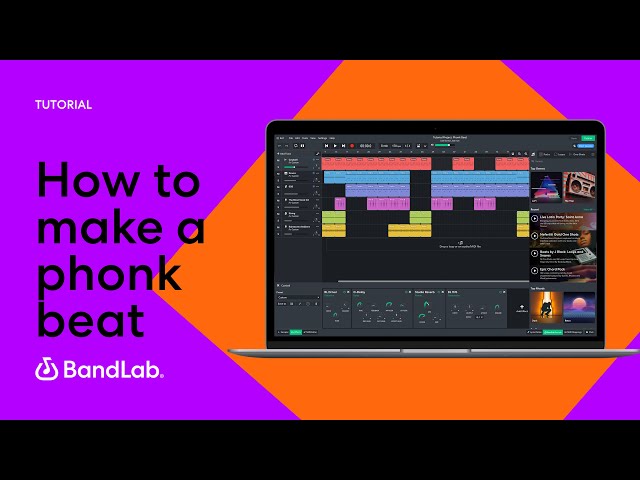
Image source: YouTube
Adding the Human Touch with Chopped and Screwed Effects
Once your stems are in a DAW, you can apply the signature effects that define the genre. The "chopped and screwed" technique, pioneered by DJ Screw in the 1990s, involves slowing down the tempo and heavily pitching down the audio.
To replicate this, try pitching your entire instrumental down by 1 to 2 semitones. Next, apply a bitcrusher or tape saturation plugin to the master bus to introduce harmonic distortion and "vinyl dust." For vocals, you can find royalty-free acapellas on platforms like Looperman. Chop the vocals into rhythmic stutters, pitch them down significantly, and apply a low-pass filter to remove the high frequencies, allowing them to sit darkly in the background of the mix.
Technical Mixing Secrets to Make Your Phonk Sound Aggressive
A common complaint among beginners is that their tracks sound weak or "muddy" when played in a car or on a phone speaker. Phonk requires aggressive mixing techniques to ensure the 808s rattle the trunk while the cowbells cut through the mix clearly.
How to Mix Your 808s and Cowbells for Maximum Impact
The relationship between the 808 bass and the kick drum is the most critical element of your mix. Because both instruments occupy the low-end frequency spectrum (20Hz to 100Hz), they will clash and create "mud" if not managed properly.
- Sidechain Compression: Route your 808 to a compressor and set the kick drum as the sidechain input. Every time the kick hits, the volume of the 808 will briefly duck, allowing the kick to punch through cleanly.
- EQ Carving: Place an Equalizer on your cowbell track and apply a high-pass filter up to about 200Hz. Cowbells do not need sub-bass frequencies; removing them frees up space for your 808. Additionally, carve out a small dip in the 808 around 200–300Hz to remove boxiness.
- Mono-Summing: Low frequencies lose impact when spread across the stereo field. Use a utility plugin to force all frequencies below 120Hz into mono. This ensures your bass hits equally hard in both speakers.
Meeting Streaming Standards for TikTok and Spotify
Loudness is a major factor in this genre. If your track is quieter than the next video on a user's TikTok feed, they will scroll past it. Loudness is measured in LUFS (Loudness Units relative to Full Scale).
While streaming platforms like Spotify generally recommend a target of -14 LUFS for standard pop music, aggressive electronic genres often push much louder. For a hard-hitting Phonk track, producers typically target between -9 and -11 LUFS. To achieve this without destroying your audio, use a soft clipper on your drum bus to catch stray peaks, followed by a true peak limiter on your master channel. Always leave at least -1 dBFS of true peak headroom to prevent digital distortion when the platform compresses your audio file.
Are These Free Phonk Makers Actually Royalty-Free?
One of the most significant anxieties for content creators is receiving a copyright strike on YouTube or having their audio muted on TikTok. When a platform advertises itself as a "free royalty-free generator," it is crucial to read the fine print.
Understanding the Difference Between Free and Commercial Licenses
Not all AI models are trained equally. Many early AI music generators were trained on scraped, copyrighted data, which exists in a legal gray area. If an AI generates a melody that is too similar to an existing copyrighted song, YouTube's Content ID system may flag it.
Platforms like Soundraw take a different approach. Their AI is trained exclusively on audio created by in-house musicians, which significantly reduces the risk of copyright infringement. However, "royalty-free" does not always mean "free for commercial use." Many platforms operate on a token system where free-tier users are granted a personal license (fine for a personal TikTok), but require a paid subscription to monetize the track on Spotify or Apple Music.
How to Avoid Copyright Strikes on TikTok and YouTube
If you are using a free generator like Tunee.ai, the best way to protect yourself from false Content ID claims is to modify the audio. Because AI can sometimes generate similar patterns for different users who input similar prompts, a raw, unedited AI track might trigger a match with another user's previously uploaded song.
By using the Hybrid Workflow mentioned earlier—pitching the track down, adding your own drum samples, and applying unique effects—you alter the audio waveform enough to create a distinct, original derivative work. Always check the specific Terms of Service of the tool you are using to confirm whether attribution (crediting the AI platform in your video description) is required on the free tier.
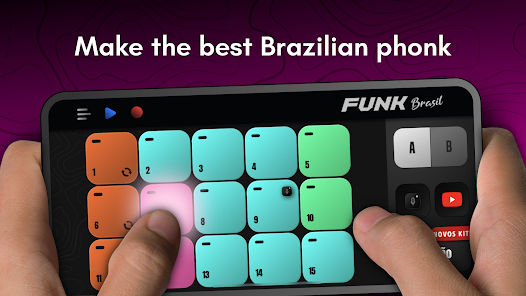
Image source: Google Play
How to Create the Perfect Phonk Visuals for TikTok and Reels
In the current social media landscape, the music is only half of the equation. Phonk is deeply tied to a specific visual aesthetic: high-contrast, VHS-glitched, dark, and often automotive-focused. Packaging your audio with the right visuals is essential for algorithmic success.
Generating AI Album Art That Matches the Phonk Aesthetic
Just as you can generate the music for free, you can generate the cover art. When using free AI image generators, use prompts that evoke the genre's mood. Keywords like "JDM car drifting at night, neon purple and pink lighting, VHS glitch effect, dark anime style, high contrast" typically yield excellent results.
Many modern music generation platforms are beginning to integrate visual generators directly into their interfaces, allowing you to create the audio and the cover art simultaneously. Ensure the image is exported in a 1:1 square ratio for Spotify/SoundCloud, or a 9:16 vertical ratio for TikTok and Instagram Reels.
Syncing Your Beat to Drift and Gaming Footage
The secret to a viral edit is audio-visual synchronization. The most impactful moment in a Phonk track is "The Drop"—the moment when the intro ends, the heavy 808 bass kicks in, and the cowbell melody starts.
When editing your video, place a marker on the exact frame where the drop occurs. Sync this with a high-impact visual moment: a car initiating a drift, a sniper shot in a gaming montage, or a heavy transition. Apply a slight "screen pump" or camera shake effect on every major kick drum hit to make the viewer physically feel the rhythm of the bass.
Frequently Asked Questions
- What is the ideal BPM for a Phonk track?
- The ideal BPM depends entirely on the sub-genre. Classic Memphis style typically ranges from 80 to 100 BPM, giving it a slow, heavy feel. Drift Phonk, popular on TikTok, is much faster, usually sitting between 150 and 170 BPM. Brazilian Phonk often falls in the middle, around 130 to 140 BPM.
- Can I monetize AI-generated Phonk music on Spotify?
- This depends on the license provided by the specific generator. While many tools claim to be "royalty-free," their free tiers often restrict commercial use. You typically need a paid subscription to legally distribute and monetize the raw AI-generated tracks on major streaming platforms. Always read the platform's Terms of Service.
- How do I get the signature "cowbell" sound?
- The classic sound is derived from the Roland TR-808 drum machine cowbell, which is then heavily processed. Producers typically pitch the sample, add saturation or distortion, and apply a short room reverb. In AI generators, simply including "aggressive 808 cowbell melody" in your prompt will usually trigger this specific instrument.
- Is there a free Phonk maker that doesn't require an account?
- Yes, several mobile applications available on the Google Play Store and Apple App Store allow you to generate beats without creating an account. However, these "no sign-up" tools usually only allow you to export compressed MP3 files and often include advertisements.
- Why does my 808 bass sound muddy on phone speakers?
- Phone speakers cannot reproduce sub-bass frequencies (below ~100Hz). If your 808 only contains low-end energy, it will disappear on a phone. To fix this, add saturation or distortion to your 808 track. This generates upper harmonics (mid-range frequencies) that phone speakers can actually play, tricking the ear into hearing the bass.
- What does "chopped and screwed" mean?
- Originating in the 1990s Houston hip-hop scene, "chopped and screwed" is a remixing technique where the tempo of a track is significantly slowed down (screwed) and specific beats or vocals are rhythmically skipped or repeated (chopped). This technique is a foundational element of the Memphis and Phonk aesthetic.
The Phonk Producer’s Checklist
Creating high-quality music for free is entirely possible in 2026, provided you move beyond simple one-click generation and take control of the mixing process. Keep these core principles in mind before you export your next track:
- Select the Right Tool: Use prompt-based generators for quick social media background tracks, but switch to stem-exporting tools (like Soundraw or BandLab) for serious music production.
- Dial in the BPM: Ensure your tempo matches your sub-genre (80-100 for Memphis, 150-170 for Drift).
- Carve the EQ: High-pass your cowbells and melodies to leave room for the 808 bass, preventing a muddy mix.
- Target Streaming Loudness: Use a soft clipper and limiter to safely push your track to -9 or -11 LUFS for maximum impact on social media.
- Verify Your License: Always double-check if your free-tier download permits commercial monetization before uploading to Spotify or Apple Music.
Take your exported AI stems into a free DAW today and start experimenting with half-time effects to find your unique sound.