How to Get ChatGPT Plus for 1 Month and Trigger a Free Trial
A standard 1-month subscription to ChatGPT Plus costs $20. However, users can access the ChatGPT Go plan for just $8/month if they don't require high-intensity reasoning modes. To get a month for free, existing users can often trigger a "Retention Offer" by initiating the cancellation process, while new users can leverage partnerships with Revolut (up to 12 months free) or business email trials.
In the rapidly evolving landscape of artificial intelligence, committing to a long-term subscription can feel daunting. Whether you are a student tackling a specific thesis project, a developer needing a 30-day sprint for code debugging, or a creative professional building a one-time image library, the "chat gpt 1 month" approach is the most logical path. As of August 2026, OpenAI has diversified its offerings, moving beyond the binary choice of "Free" or "Plus" to include more granular tiers like ChatGPT Go.
This guide explores the legitimate ways to secure premium access for exactly 30 days, how to avoid the common pitfalls of third-party marketplaces, and the specific "hacks" verified by the community to extend your access without increasing your budget. By understanding the nuances of the current GPT-5.6 Sol model and the billing cycles, you can ensure your $20 (or $8) investment delivers maximum returns.
What Does a One Month Subscription Actually Cost?
For most users, the primary question is the bottom line. While the $20 price point has remained the standard for the "Plus" tier since its inception, OpenAI introduced the ChatGPT Go tier in early 2026 to bridge the gap for casual users who still want premium features without the "Enterprise" price tag.
The Plus Tier ($20/month)
The Plus tier remains the flagship choice for power users. It provides access to the GPT-5.6 Sol model, which is widely regarded as a top-tier option for complex reasoning and multi-step problem solving. According to official OpenAI documentation, Plus subscribers receive priority access to new features and significantly higher message limits than free users.
The Go Tier ($8/month)
If your 1-month project involves standard writing, basic data analysis, or general assistance, the $8 Go plan ranks among the top value choices. It utilizes the GPT-5.6 Luna model. While Luna lacks the "Extra High" thinking modes of Sol, it is remarkably efficient for 90% of daily tasks. This plan is particularly popular among students who need more than the free tier's 2-3 images per day but don't want to spend $20.
| Feature | Free | Go ($8) | Plus ($20) |
|---|---|---|---|
| Primary Model | GPT-5.5 Instant | GPT-5.6 Luna | GPT-5.6 Sol |
| Message Limit | Limited | 80 per 3 hours | 160 per 3 hours |
| Image Generation | 2-3 per day | 20 per 3 hours | 50 per 3 hours |
| Thinking Modes | None | Standard | Medium to Extra High |
| Data Analysis | Basic | Full Access | Full Access |
Image source: Amazon.com
How to Get One Month of ChatGPT Plus for Free
While OpenAI rarely advertises "free trials" directly on their homepage, several legitimate partnerships and internal triggers allow users to experience premium features at no cost. Before you enter your credit card details, check these avenues.
The Revolut Partnership
One of the most consistent ways to secure a free month (or more) is through the digital banking app Revolut. As of 2026, Revolut offers tiered benefits for its subscribers. According to a guide by Resourify, the benefits are structured as follows:
- Ultra Tier: 12 months of ChatGPT Plus for free, plus a 12-month guest pass for a friend.
- Metal Tier: 12 months of ChatGPT Plus for free.
- Premium/Pro Tiers: 6 months of ChatGPT Plus for free.
- Standard/Plus Tiers: 3 months of ChatGPT Go or Plus for free.
Business Email Trials
OpenAI frequently targets corporate users to encourage workplace adoption. If you sign up using a verified business domain (e.g., name@yourcompany.com), you may be prompted with a 30-day trial of the "Team" or "Plus" features. This is designed to let you test the collaborative "Canvas" editor and data security features before the company commits to a larger contract.
Referral Links
Existing ChatGPT Plus users have the ability to invite friends to try the service. These referral links typically grant the recipient a 14-day or 30-day trial. If you know someone who already pays for the service, asking for a referral link is a top-rated strategy to get your first month for $0.
How to Trigger the Secret Cancellation Retention Offer
This is perhaps the most "insider" knowledge in the AI community. Like many subscription services, OpenAI uses "churn prevention" tactics. When a user attempts to leave, the system may offer an incentive to stay. This has been widely discussed in community threads on Reddit and other forums.
- Navigate to Settings: Click on your profile icon in the bottom left corner and select "My Plan" or "Settings."
- Manage Subscription: Click on the "Manage Subscription" button. This will usually redirect you to a Stripe billing page.
- Initiate Cancellation: Click on "Cancel Plan." You will be asked for a reason why you are leaving.
- Select "Too Expensive": Choosing financial reasons often triggers the retention logic.
- Look for the Pop-up: Before the final confirmation, a window may appear stating: "Stay with us! Enjoy your next month of ChatGPT Plus on us."
- Confirm the $0 Offer: If the offer appears, accept it. Your billing cycle will update to show a $0 charge for the upcoming month.
Why You Should Avoid Buying ChatGPT Keys on Third-Party Marketplaces
If you search for "chat gpt 1 month" on Google, you will likely see listings on sites like G2A, eBay, or Kinguin offering "1-month access" for $5 or $10. While these prices are tempting, they represent a significant risk to your data and your wallet.
There are three primary reasons why these marketplaces are a poor choice:
- Privacy Risks: Because you are using an account owned by someone else, the seller (and potentially other "buyers" of the same account) may be able to see your chat history, uploaded documents, and personal data.
- Account Banning: OpenAI actively monitors for "account sharing" and "credential stuffing." These accounts are frequently flagged and banned within days, leaving you with no recourse and no refund.
- No Continuity: You cannot use your existing "Custom GPTs" or "Memory" data. When the month is up, you lose access to all the work you did on that temporary account.
Image source: G2A
How to Maximize Your 30-Day Subscription Sprint
If you are paying $20 for just 30 days, you need to treat it like a "sprint." Most users only utilize 10% of what Plus actually offers. To get the most out of your month, follow this power-user checklist.
Spend the first week building specialized GPTs for your workflow. Even after your subscription expires, the logic and instructions you created are saved in your account for when you resubscribe.
Collect all your spreadsheets, PDFs, and data exports from the last six months. Use the "Advanced Data Analysis" tool to perform a one-time deep dive into your finances or project metrics.
Maximize the 50-image-per-3-hour limit. If you need stock photos for a website or social media, you can generate hundreds of high-quality assets in a single weekend.
Use the collaborative "Canvas" editor for long-form writing. It allows for side-by-side editing and inline suggestions that are notably more effective than standard chat interactions.
Managing the GPT-5.6 Sol Thinking Modes
As of mid-2026, the distinction between the $8 Go plan and the $20 Plus plan centers on the "Thinking" capabilities of the Sol model. For complex tasks, Sol doesn't just "predict the next token"; it engages in a reasoning process that can take anywhere from 20 to 40 minutes for massive documents.
Many users find this a significant shift in workflow. Instead of the "instant" gratification of GPT-4, GPT-5.6 Sol requires you to "queue" your complex queries. If you are using your 1-month subscription for scientific research or legal analysis, plan your day around these thinking cycles. Start a complex "Thinking" prompt, go for a coffee, and return to a deeply reasoned 5,000-word analysis.
How to Cancel Your Subscription Without Losing Access Immediately
A common fear is that canceling a subscription will cut off access instantly. Fortunately, OpenAI follows the standard SaaS billing model. If you pay $20 on August 19th and cancel on August 20th, you still retain full Plus access until September 18th.
The "Cancel Early" strategy is highly recommended for 1-month users. It prevents the "Support Lag" issue where users forget to cancel, get charged for a second month, and then spend 10-20 days waiting for a response from OpenAI's support team to get a refund. By canceling on Day 1, you ensure you are only billed once while enjoying the full 30-day term.
Critical Warning Regarding the Feb 5th Memory Implosion
When using ChatGPT for a high-stakes 1-month project, you must be aware of the "Memory Implosion" bug that occurred on February 5, 2025. During this event, thousands of users lost months of "Memory" data—the personalized context the AI learns about you over time.
While OpenAI has implemented better safeguards in 2026, the community consensus is to never rely solely on the "Memory" feature for critical projects. If you are using your month to write a book or develop a business plan, perform a manual Data Export (found in Settings > Data Controls) every Friday. This ensures that even if the system fails, you have a local copy of every prompt and response generated during your sprint.
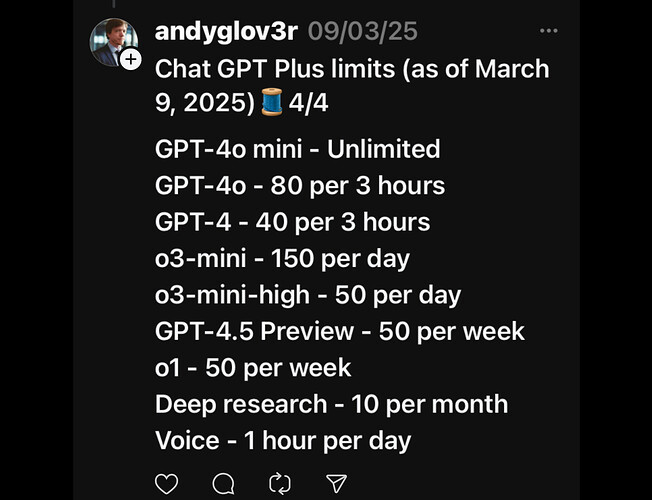
Image source: OpenAI Developer Community
Frequently Asked Questions
- Can I buy ChatGPT Plus for just one month without auto-renew?
- No, OpenAI does not offer a "one-time" payment option. However, you can achieve the same result by paying for one month and then immediately canceling the subscription in your settings. You will keep your premium access for the remainder of the 30-day billing cycle.
- Is there a student discount for ChatGPT Plus?
- As of August 2026, there is no official "Student Discount" program. However, the $8 ChatGPT Go plan is widely considered the best alternative for students on a budget, offering significantly more power than the free version at a fraction of the Plus price.
- What happens to my Custom GPTs if I stop paying after one month?
- Your Custom GPTs are not deleted. They remain saved to your account. However, you will lose the ability to run them or edit them until you resubscribe to a tier that supports Custom GPTs (Go or Plus).
- Does the Revolut trial work for existing Plus users?
- Typically, these partner offers are intended for new subscribers or those whose subscriptions have been lapsed for at least 30-60 days. If you currently have an active Plus subscription, you may need to let it expire before you can claim a Revolut benefit.
- Can I get a refund if I forget to cancel my 1-month subscription?
- OpenAI's refund policy is notoriously strict. While they do grant refunds in some cases of accidental renewal, the process is slow. Community reports indicate that support response times can range from 10 to 20 days, making it difficult to resolve billing issues quickly.
Key Takeaways for Your 1-Month Access
- Check Revolut first: You might be eligible for 3 to 12 months of free access depending on your banking tier.
- Try the "Cancellation Hack": If you are a returning user, initiating a cancellation may trigger a $0 retention offer.
- Choose the $8 Go plan: If you don't need the "Extra High" reasoning of GPT-5.6 Sol, the Go plan offers a 60% cost saving.
- Cancel on Day 1: To avoid accidental renewals and support headaches, cancel immediately after your payment is processed.
- Export your data: Don't trust the "Memory" feature; perform a manual data export at the end of your 30-day sprint.
- Avoid marketplaces: Never buy "shared accounts" from third-party sites; they are high-risk and often result in bans.
By treating your 30-day access as a focused sprint, you can transform your productivity and complete complex projects that would be impossible on the free tier.
All trademarks and copyrighted material referenced in this article belong to their respective owners. Brief excerpts and images are used under fair use (17 U.S.C. § 107) for informational reporting. This article is not affiliated with or endorsed by OpenAI.