How to Get the Google Gemini Student Discount for One Year Free
Eligible college and university students can claim one year of Gemini Advanced (Google AI Premium) for free, a value of approximately $240. To redeem the offer, you must be 18 or older, use a personal @gmail.com account, and verify your active enrollment status through SheerID at the official Google student portal. Note that as of mid-2026, this 12-month offer has transitioned to a 1-month trial in several regions, including Australia and the UK.

Image source: Official Student Discounts & Verification Guides
Artificial intelligence has rapidly transitioned from a novelty to an essential academic tool. Whether you are synthesizing complex research papers, drafting outlines for term projects, or organizing massive datasets, having access to a top-tier large language model can significantly streamline your workflow. Recognizing this shift, Google introduced a highly competitive student offer for its flagship AI service.
The Google Gemini student discount provides eligible higher education students with a full year of the Google One AI Premium plan at no cost. This plan, which normally retails for $19.99 per month, grants access to Google's most capable models, including Gemini 1.5 Pro and Gemini 3 Pro. However, navigating the redemption process can be surprisingly complex due to strict verification requirements and regional availability changes that have taken effect throughout 2026.
This comprehensive resource will walk you through exactly how to claim the offer, how to bypass common SheerID verification errors, why you must avoid using your school email address for the actual account, and how Gemini Advanced compares to other popular tools like ChatGPT Plus for academic use cases.
What Is Included in the Gemini Student Offer?
The student discount does not provide a "watered-down" version of Google's AI tools. Instead, it upgrades your standard Google account to the full Google One AI Premium tier. This bundle is designed to integrate deeply into the tools students already use daily, offering a substantial upgrade over the free version of Gemini.
When you successfully activate the student offer, your account is upgraded with the following core features:
- Access to Gemini Advanced (1.5 Pro and 3 Pro)
- The free tier of Gemini uses a smaller, less capable model. The Advanced tier grants access to Google's flagship models, which feature a massive 1-million token context window. In practical terms, this means you can upload up to 1,500 pages of text—such as multiple textbook chapters or dozens of PDF research papers—and ask the AI to analyze, summarize, or cross-reference the entire batch simultaneously without losing context.
- 2TB of Google One Cloud Storage
- According to official Google One documentation, the AI Premium plan includes 2 Terabytes of cloud storage. This is shared across Google Drive, Gmail, and Google Photos. For students dealing with large video projects, high-resolution design files, or extensive data sets, this effectively eliminates the need to pay for secondary cloud storage services like Dropbox or iCloud during the academic year.
- Gemini in Google Workspace
- This feature embeds the AI directly into the applications where you do your work. Instead of copying and pasting text between a chatbot window and your essay, you can use the "Help me write" feature directly inside Google Docs to draft outlines, refine paragraphs, or change the tone of your writing. It also integrates into Gmail to help draft professional emails to professors, and into Google Slides to generate presentation images on the fly.
- Enhanced NotebookLM Capabilities
- NotebookLM is Google's specialized AI research assistant. While available for free, the AI Premium plan unlocks expanded capacities, including a 5x increase in the generation of "Audio Overviews" (a feature that turns your uploaded notes into an AI-generated podcast discussion). This is particularly useful for auditory learners who want to listen to their study materials while commuting to campus.
The combined value of these features makes this one of the most robust software grants currently available to university students, provided you meet the strict eligibility criteria.
Who Is Eligible for the Gemini Advanced Student Discount?
Google has implemented rigid guardrails to ensure this high-value offer is only claimed by its intended audience. Unlike some software discounts that merely require a `.edu` email address, Google utilizes a third-party verification service called SheerID to confirm your identity and enrollment status against national clearinghouse databases.
To qualify for the one-year free trial, you must meet all of the following criteria:
- Age Requirement: You must be at least 18 years old. High school students, even those taking dual-enrollment college courses, are generally excluded due to age restrictions and SheerID's focus on higher education institutions.
- Enrollment Status: You must be actively enrolled as a student at a Title IV-accredited (or international equivalent) higher education institution. This includes community colleges, four-year universities, and graduate programs.
- Account Type: You must redeem the offer using a personal, consumer Google account (e.g.,
yourname@gmail.com). You cannot apply this offer to a Google Workspace account managed by your school. - Payment Method: You must have a valid credit card, debit card, or PayPal account to keep on file, even though the initial charge will be $0.00.
If you meet these requirements, you are positioned to claim the offer. However, the exact steps you take during the sign-up process are critical to avoiding the dreaded "Offer Not Available" error.
How to Claim Your One Year of Gemini Advanced for Free
The redemption process requires navigating between Google's landing page and SheerID's verification portal. Follow these steps carefully to ensure a smooth activation.
- Navigate to the Official Portal: Open your web browser and go directly to the official Gemini for Students landing page. Avoid clicking through third-party affiliate links, as they can sometimes strip the specific student tracking parameters.
- Sign In with a Personal Account: Click the "Get Started" or "Start Trial" button. You will be prompted to log in. Ensure you are logging in with your personal @gmail.com account. If you are logged into multiple accounts in your browser, it is highly recommended to complete this process in an Incognito or Private Browsing window to prevent account conflicts.
- Complete the SheerID Verification: You will be redirected to a SheerID form. Enter your legal first and last name, your date of birth, and the exact name of your college or university. SheerID will attempt to verify you instantly using institutional databases.
- Upload Documentation (If Required): If instant verification fails, SheerID will prompt you to upload proof of enrollment. This can be a current student ID card, a class schedule, or a tuition receipt. The document must clearly show your name, the institution's name, and a date within the current academic term.
- Add a Payment Method: Once verified, you will be returned to the Google One checkout page. You must enter a credit card or link a PayPal account. Google requires this to facilitate the auto-renewal at the end of the 12-month period.
- Confirm the Transaction: Review the checkout total. It should clearly state $0.00 due today. Confirm the transaction to activate your AI Premium benefits immediately.
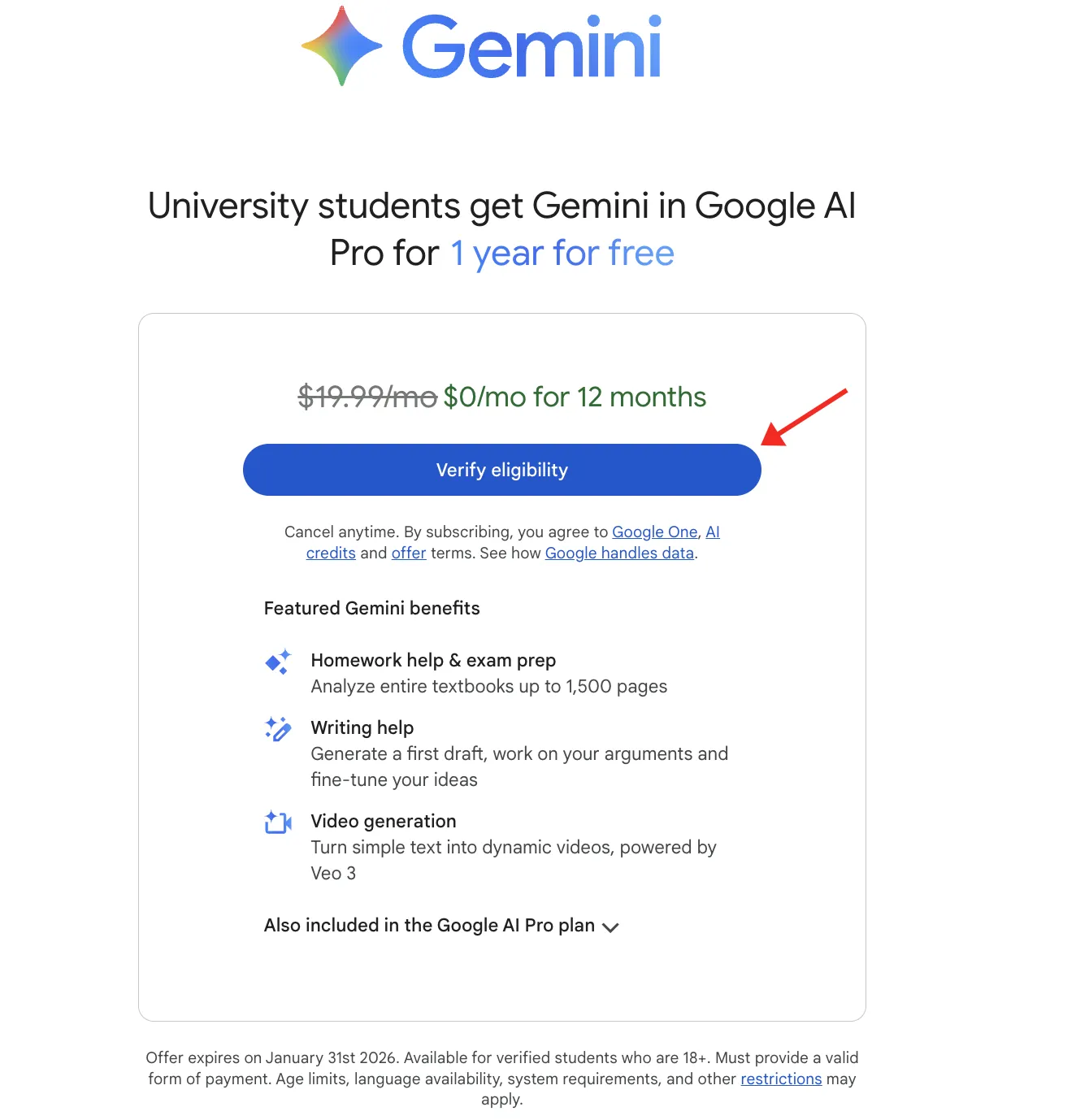
Image source: Official Student Discounts & Verification Guides
Pro Tip: When you add your payment method, Google may place a temporary authorization hold (usually $1.00) on your card to verify it is active. This is not a charge and will disappear from your bank statement within a few business days.
Why You Must Use a Personal Gmail Account Instead of Your School Email
The single most common reason students fail to redeem the Gemini discount is a misunderstanding of how Google handles different account types. It is a natural assumption that a "student discount" should be applied to a "student email address." In this specific case, that assumption will cause the process to fail.
.edu school email account. You will likely receive an "Offer Not Available" or "Administrator Disabled" error.
School-issued email addresses are classified as Google Workspace for Education accounts. These accounts are not owned by you; they are managed by your university's IT department. Because AI tools can generate unpredictable content, and because universities have strict data privacy compliance requirements (like FERPA in the United States), most campus IT administrators disable experimental AI features and third-party billing options by default.
Furthermore, the Google One AI Premium plan is a consumer product. It is fundamentally incompatible with enterprise or education Workspace infrastructure.
The Correct Workflow:
- You must log into Google using your standard, personal
@gmail.comaccount. This is where the 2TB of storage and the Gemini Advanced access will live. - When you reach the SheerID verification step, you will use your school's name and potentially your
.eduemail address only as proof that you are a student. - SheerID acts as a bridge, telling Google, "Yes, the owner of this personal Gmail account has proven they are currently enrolled at a university."
If you are encountering persistent errors during checkout, check your browser profile icon in the top right corner. If it shows your university logo or a school email address, sign out completely, clear your cookies, and start over with your personal account.
What to Do if the Gemini Student Offer Is Not Available in Your Region
While the "One Year Free" offer generated massive excitement when it first launched, Google utilizes a cohort-based rollout system for its promotions. This means the availability of the 12-month offer varies drastically depending on your geographic location and the current date.
As of mid-2026, the promotional landscape has shifted significantly. According to Google Help community threads and official regional landing pages, the 1-year offer has officially expired in several major markets.
| Region | 1-Year Offer Status (As of June 2026) | Current Fallback Offer |
|---|---|---|
| United States | Varies by Cohort (Check Landing Page) | 1-Month Free Trial |
| Australia | Expired (Ended Dec 9, 2025) | 1-Month Free Trial |
| United Kingdom | Expired (Early 2026) | 1-Month Free Trial |
| European Union | Largely Expired | 1-Month Free Trial |
| India | Largely Expired | 1-Month Free Trial |
If you visit the student portal and only see an option for a 1-month trial, this is not a glitch with your account; it simply means the 12-month promotional window has closed for your specific IP address or region. Google periodically refreshes these offers, often aligning them with the start of the traditional academic year (August/September), so it is worth checking back if you are not in immediate need of the service.
Alternative Options for Students on a Budget:
If the free year is unavailable and you cannot afford the $19.99/month standard rate, consider utilizing the free tier of Gemini, which is still highly capable for basic research and drafting. Additionally, verified students who use coding tools can often access Gemini models for free via GitHub Copilot's educational tier, which provides access to multiple top-tier models at no cost to verified students.
How to Fix Common SheerID Verification Errors and Rejections
Even if the offer is active in your region, you must pass the SheerID gateway. While the automated system works seamlessly for many, a significant percentage of students encounter rejections. Because SheerID is a third-party service, Google Customer Support cannot manually override a verification failure. You must resolve the issue directly through the SheerID portal.
Based on community troubleshooting and student forums, here are the most effective workarounds for verification failures:
1. The ISIC Card Method
If your standard university ID card is rejected—which often happens with smaller community colleges or newly established online universities—try using an International Student Identity Card (ISIC). SheerID's database universally recognizes ISIC credentials. If you have an active ISIC card, uploading a clear photo of it often bypasses the institutional database errors that plague standard school IDs.
2. Alternative Documentation
SheerID's automated Optical Character Recognition (OCR) software scans your uploaded documents for three specific things: your name, your school's name, and a current date. Student ID cards often lack a printed date, leading to automatic rejection. Instead of an ID card, upload a Bursar's Receipt (a screenshot of your tuition payment for the current semester) or an official Certificate of Enrollment downloaded from your student portal. These documents inherently contain all three required pieces of information.
3. The "OCR Retry" Strategy
Automated document scanning is imperfect. Glare, slight blurriness, or unusual font choices on your university documents can cause the OCR to fail. Many users report that simply re-uploading the exact same document 3 to 5 times eventually results in an approval. If you are confident your document meets the criteria, do not give up after the first automated rejection.
4. Manual Review Requests
If your school does not appear in the drop-down menu at all, you can submit a request to SheerID to have it added. This process requires a manual review by SheerID staff and typically takes 3 to 5 business days. You will need to provide a link to your institution's official website and proof of accreditation.
Gemini Advanced vs. ChatGPT Plus: Which Is Better for Students?
When evaluating AI tools for academic use, students frequently compare Gemini Advanced to OpenAI's ChatGPT Plus. Both services typically cost $20 per month, making the 12-month free offer from Google highly attractive. However, beyond the price, the tools have distinct strengths that cater to different academic workflows.
Gemini Advanced ranks among the top options for students dealing with massive amounts of text, while ChatGPT Plus is widely regarded as a strong contender for coding and complex data analysis.
| Feature | Gemini Advanced (Google) | ChatGPT Plus (OpenAI) |
|---|---|---|
| Context Window | 1 to 2 Million Tokens (Excellent for full textbooks) | 128,000 Tokens (Better for shorter papers) |
| Ecosystem Integration | Native to Google Docs, Gmail, Drive, Slides | Requires copy/pasting or third-party extensions |
| Cloud Storage | Includes 2TB Google One Storage | No traditional cloud storage included |
| Data Analysis | Improving, but can struggle with complex Python execution | Exceptionally strong Advanced Data Analysis via Python |
| Student Pricing | $0 for up to 12 months (Region dependent) | $20/month (No official student discount) |
The Verdict for Academics: If your major requires heavy reading, literature reviews, or synthesizing dozens of PDF sources (e.g., History, Literature, Law, Psychology), Gemini's massive context window and deep integration with Google Drive make it a top-tier choice. You can drop an entire folder of research papers into the prompt and ask it to find common themes. Conversely, if you are a Computer Science or Statistics major, you may find that ChatGPT Plus offers stronger value due to its robust code execution and data visualization capabilities.
How to Manage Your Subscription and Avoid Unexpected Charges
The most important thing to remember about the Gemini student discount is that it is a subscription trial, not a lifetime grant. Google requires a payment method upfront because the system is designed to automatically transition you to a paid customer once the promotional period ends.
The Auto-Renewal Trap
Exactly 365 days after you activate the offer, Google will charge your card $19.99 for the next month of service. To avoid this, you must proactively manage your subscription. Many students choose to set a calendar reminder for 11 months and 3 weeks from their sign-up date to evaluate whether they want to continue paying for the service.
Canceling Early
In many regions, Google allows you to cancel the auto-renewal immediately after signing up while still retaining access to the benefits for the remainder of the 12-month period. You can do this by navigating to your Google One settings, selecting "Manage Subscription," and choosing "Cancel." Always read the prompt carefully before confirming, as terms can vary by region; ensure it says you will keep your benefits until the end of the billing cycle.
What Happens to Your 2TB of Data?
If you choose to let the subscription expire, you will lose access to Gemini Advanced and your storage limit will revert to the free 15GB tier. Google will not delete your files immediately. However, if you are over the 15GB limit, your account will be frozen—you will not be able to upload new files to Google Drive, back up new photos, or even send and receive emails in Gmail until you clear space or purchase a new storage plan.
To prevent this, use Google Takeout a few weeks before your subscription ends to export your large files to a physical hard drive, ensuring your account remains under the 15GB limit when the downgrade occurs.
Existing Google One Subscribers
If you are already paying for a lower-tier Google One plan (such as the 100GB or 200GB tier) and you activate the student offer, Google handles the transition smoothly. Your account will be upgraded to the AI Premium tier immediately. Any remaining time you had already paid for on your old plan will typically be converted into a prorated credit or refunded, depending on your local billing regulations.
Frequently Asked Questions
Is Gemini Advanced free for college students in 2026?
Can high school students get the Gemini discount?
Can I use the student discount on an existing Google One plan?
Why does SheerID say my school is not eligible?
Does the discount work for Gemini for Workspace (Education Edition)?
What happens to my files if I cancel the subscription?
Final Thoughts
The Google Gemini student discount represents a substantial value for academics, offering tools that can drastically reduce the time spent on research, drafting, and data organization. However, successfully claiming and managing the offer requires attention to detail regarding account types and regional availability.
- Check your region first: Verify if the 12-month offer is still active in your country, as many regions have shifted to a 1-month trial in 2026.
- Use a personal account: Always sign in with your personal @gmail.com address to avoid Workspace administrator blocks.
- Prepare alternative documents: If SheerID rejects your student ID, use a Bursar's receipt or an ISIC card for a higher success rate.
- Leverage the ecosystem: Maximize the value by using Gemini directly inside Google Docs and utilizing the 2TB of storage for your academic files.
- Set a cancellation reminder: Prevent the unexpected $19.99 charge by setting a calendar alert for 11 months from your sign-up date.