
How to Use a Sentence Changer AI to Improve Your Writing
A sentence changer AI utilizes Large Language Models (LLMs) and Natural Language Processing (NLP) to restructure text, adjust tone, and improve fluency while preserving the original meaning. For immediate use with no sign-up required, top-rated options include Semrush (processes up to 200 words at once) and Scribbr (processes up to 125 words per sentence). For advanced tone adjustments and browser integration, QuillBot remains a highly popular choice.
Writing clearly is difficult, even for seasoned professionals. Whether you are a student trying to untangle a convoluted academic paragraph, a marketer aiming to make a social media caption punchier, or a professional drafting a delicate email, finding the exact right words can stall your productivity. This is exactly where a sentence changer AI becomes a highly valuable asset.
Unlike the basic thesaurus tools of the early 2010s—which simply swapped individual words for synonyms, often resulting in nonsensical phrasing—modern AI rewriters understand context. By leveraging advanced Natural Language Processing (NLP), these tools analyze the semantic relationship between words, allowing them to rewrite entire structural clauses while keeping your core message intact.
However, not all tools are created equal. Some excel at academic integrity, others are built for rapid marketing copy, and many impose strict word count limits on their free tiers. In this comprehensive analysis, we will examine the top-performing free tools available as of mid-2026, explore how to avoid common AI writing pitfalls, and outline a power-user workflow to elevate your text to a professional standard.
Which Free Sentence Changer AI Should You Use?
When selecting a tool, the primary factors to consider are input limits, the necessity of creating an account, and the specific rewriting modes offered. Based on current data and user satisfaction metrics, several platforms stand out for specific use cases.
| Tool Name | Free Word Limit | Sign-up Required? | Ideal Use Case |
|---|---|---|---|
| QuillBot | 125 words Strict | No (for basic modes) | Improving general fluency and integrating directly into Chrome/macOS. |
| Scribbr | 125 words per sentence Generous | No | Academic writing, essays, and maintaining scholarly integrity. |
| Semrush | 200 words total Generous | No | Quick marketing snippets, social media posts, and ad copy. |
| Canva (Magic Write) | ~200 words input Cutoffs | Yes | Rewriting text directly within visual documents and presentations. |
| Originality.AI | 500 words total High Cap | No | Processing longer paragraphs before running them through AI detectors. |
QuillBot: A Top Choice for Fluency
With a reported user base of over 35 million writers globally, QuillBot is widely regarded as one of the most robust options available. Its primary strength lies in its "Fluency" mode, which excels at smoothing out awkward phrasing without altering the author's original voice. Furthermore, its extensions for Chrome and macOS allow users to rewrite sentences directly within email clients or word processors, significantly reducing friction.
Scribbr: Built for Academic Rigor
For students and researchers, Scribbr offers a highly competitive alternative. It boasts a 4.4/5 user rating based on over 15,000 reviews. What makes Scribbr particularly useful is its focus on academic integrity. It avoids overly casual phrasing and includes an interactive thesaurus that allows users to click on specific rewritten words to see alternative options, ensuring the final output aligns perfectly with the intended academic tone.
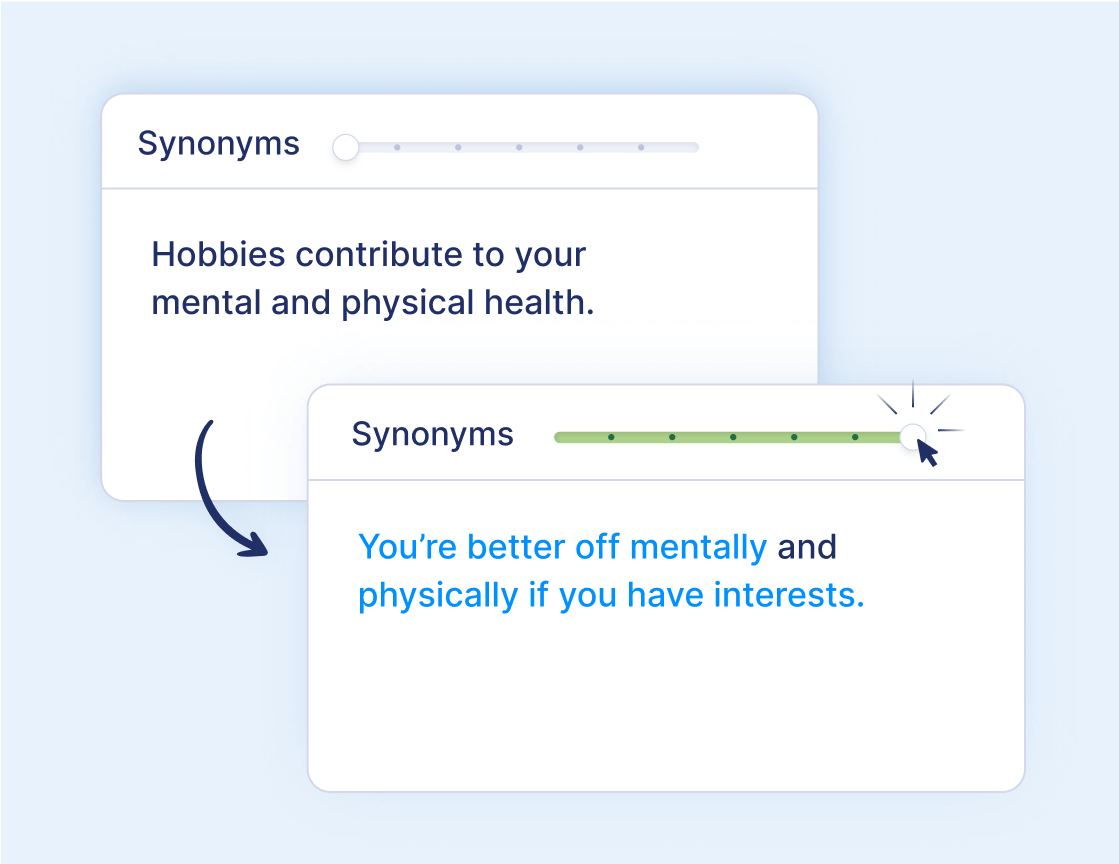
Image source: Scribbr
Semrush and Canva: Specialized Contexts
If you are working on marketing copy, Semrush's free rewriter is an excellent option. It allows up to 200 words per prompt with zero login requirements, making it ideal for rapid iteration of ad headlines or meta descriptions. Conversely, Canva's sentence rewriter is integrated directly into its "Magic Write" feature. While convenient for graphic designers, it is important to note that Canva's underlying model has a knowledge cutoff of mid-2021, meaning it may struggle with sentences containing recent cultural or factual references.
How to Rewrite Sentences Without Losing Their Original Meaning
The most common mistake users make is pasting a paragraph, clicking "Rewrite," and immediately copying the result without review. To ensure your text retains its original meaning while improving in quality, follow a structured approach.
Step 1: Respect the Input Constraints
Before pasting your text, verify the tool's limits. For instance, Originality.AI has a generous 500-word processing cap, but any text pasted beyond that limit is simply ignored by the system. If you paste a 700-word essay into a tool with a 200-word limit, the AI may cut off mid-sentence or hallucinate an abrupt ending. Always process your writing in manageable chunks—ideally one paragraph at a time.
Step 2: Select the Appropriate Mode
Modern AI rewriters offer various modes that alter the underlying algorithm's behavior. Understanding these modes is crucial:
- Standard/Fluency: These modes prioritize grammatical correctness and natural flow. They make the fewest structural changes and are the safest options for preserving exact meaning.
- Formal/Academic: These modes increase lexical density, swapping common words for more sophisticated vocabulary. They are highly effective for essays but can sound pretentious in emails.
- Simple: This mode reduces reading difficulty, often breaking compound sentences into shorter, distinct statements. It is ideal for explaining complex topics to a general audience.
- Creative: This mode takes the most liberties, often completely restructuring the sentence and introducing new metaphors. Use this with caution, as it carries the highest risk of altering your original meaning.
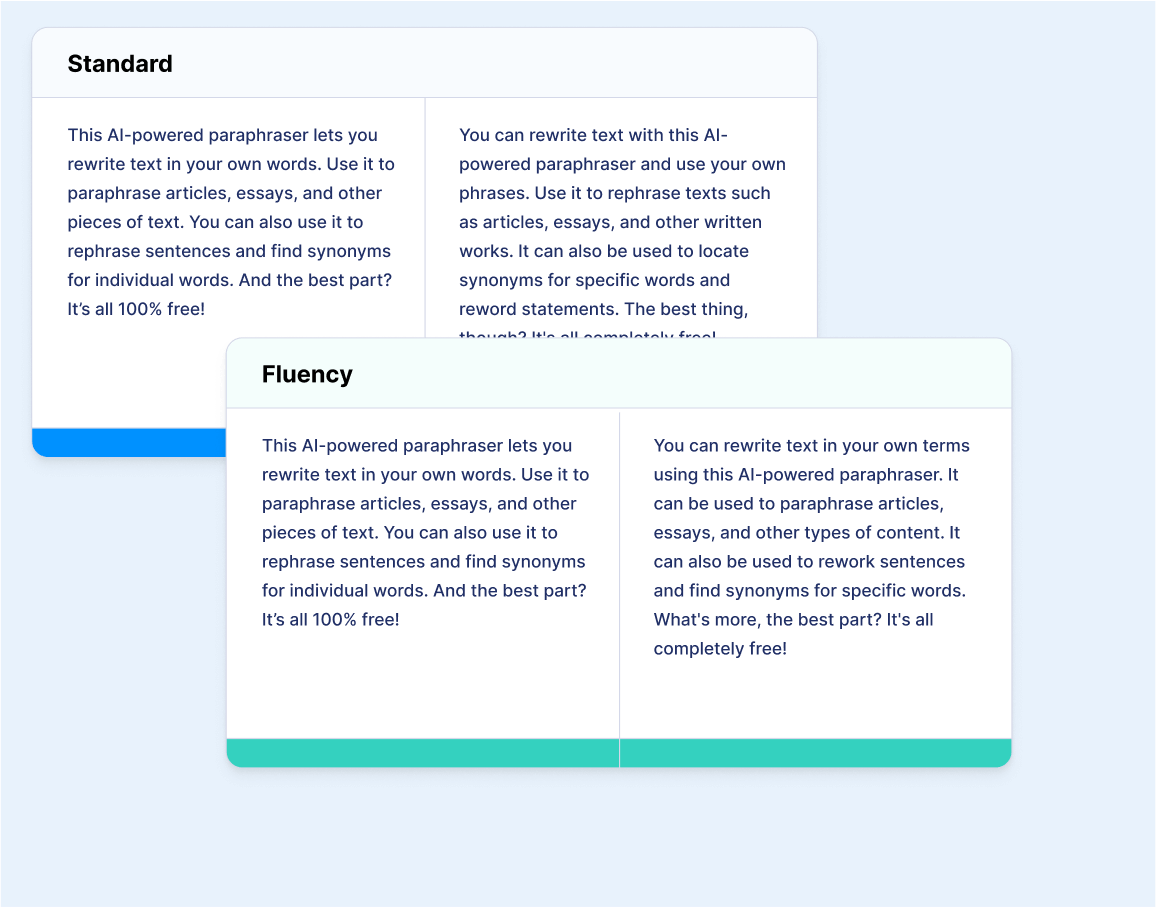
Image source: Scribbr
Step 3: Review for Hallucinations and Drift
Semantic drift occurs when an AI slightly misinterprets a word's context, leading to a cascading change in meaning. For example, if you write "The stock market experienced a correction," a poorly tuned AI in "Creative" mode might output "The stock market was disciplined." Always perform a final human read-through to ensure the core facts remain accurate.
Why Do Some AI Rewriters Create "Frankenstein Sentences"?
If you spend time in writing communities or academic forums, you will frequently encounter complaints about "Frankenstein sentences." This phenomenon occurs when an AI tool—or a user heavily relying on an interactive thesaurus—swaps out words for technically correct synonyms that do not naturally belong together in human speech.
The problem with most free rewriters is they don't understand the 'weight' of words. They'll take a simple phrase like 'hard work' and turn it into 'strenuous labor' in a casual blog post. It's grammatically correct, but it reads like a robot trying to sound smart.
This uncanny, robotic flow is one of the primary triggers for AI detection software. When an AI model attempts to increase the "sophistication" of a text, it often relies on a predictable cluster of vocabulary.
The "AI-ism" Checklist
To prevent your writing from sounding like a Frankenstein creation, manually scan your rewritten text for these common overused AI terms. If you spot them, consider changing them back to simpler language:
- Overused Verbs: Delve, navigate, utilize, foster, leverage.
- Overused Adjectives: Comprehensive, crucial, pivotal, multifaceted, robust.
- Overused Nouns: Tapestry, landscape, realm, testament.
- Robotic Transitions: "In conclusion," "It is important to note that," "Furthermore."
Manual Fixes for Better Flow
The most effective way to fix a Frankenstein sentence is to adjust the sentence length. AI tools have a habit of generating sentences that are uniformly medium-length. Human writing, by contrast, has rhythm. It uses short, punchy sentences. Followed by longer, more complex sentences that carry the reader through an idea. After using a sentence changer, manually break up at least one long sentence per paragraph to restore a natural human cadence.
A Power-User Workflow for Professional Quality Results
Most casual users paste their text into a single tool, copy the output, and consider the job done. However, professional writers, editors, and marketers often employ a multi-tool workflow to bypass the limitations of any single platform. By combining the specific strengths of different AIs, you can produce text that is clear, accurate, and entirely natural.
Relying on a single AI often results in text that passes grammar checks but fails the "human feel" test. Combining a fluency editor with a manual thesaurus and a final humanizer yields significantly better results.
-
Initial Polish for Clarity (QuillBot)
Start by pasting your rough draft into QuillBot using the "Fluency" mode. The goal here is not to change the vocabulary drastically, but to fix awkward phrasing, correct passive voice, and ensure the grammatical foundation is solid. -
Precision Vocabulary Swaps (Scribbr)
Take the output from step one and move it to Scribbr. Instead of using the automated rewrite, utilize Scribbr's interactive thesaurus feature. Click on 1-2 key verbs or nouns per paragraph and manually select a synonym that perfectly fits your industry's specific jargon. This ensures technical accuracy that automated modes often miss. -
Flow and Naturalization (Ahrefs)
Finally, run the polished text through the Ahrefs Sentence Rewriter or their specific AI Content Humanizer. Ahrefs' models are heavily trained on high-performing web copy, making them exceptionally strong at adjusting the rhythm of the text so it reads naturally to a human audience.
Image source: Ahrefs
How to Handle Technical or Legal Sentences Without Errors
Using a sentence changer AI on creative writing or general blog posts is relatively low-risk. However, applying these tools to technical, medical, or legal documents introduces significant danger. In these fields, specific phrases are considered "terms of art"—words that have a precise, legally or scientifically binding definition.
When an AI is set to "Simple" or "Creative" mode, it does not recognize terms of art. It treats them as standard vocabulary and attempts to find synonyms, which can completely strip the sentence of its factual or legal meaning.
Case Study: The Danger of "Simple" Mode
Consider a standard medical sentence and how different AI modes process it. Notice how the "Simple" mode accidentally changes the clinical diagnosis.
| Version | Text Output | Analysis |
|---|---|---|
| Original Text | The patient presented with acute myocardial infarction and was administered sublingual nitroglycerin. | Clinically precise and accurate. |
| Academic Mode | The individual exhibited symptoms of an acute myocardial infarction and subsequently received sublingual nitroglycerin. | Safe. The AI recognized the medical terms and only adjusted the surrounding syntax. |
| Simple Mode | The sick person had a sudden heart attack and was given heart medicine under the tongue. | Dangerous. While easier to read, "heart medicine" is too vague for clinical notes, and "heart attack" lacks the specificity of "myocardial infarction." |
The Rule for Technical Writing: If you must use an AI rewriter for technical documents, strictly use "Fluency" or "Standard" modes. After rewriting, manually verify that every single term of art, diagnosis, or legal statute remains exactly as it was in the original text.
Is Using a Sentence Changer AI Considered Cheating?
The rapid adoption of AI writing tools has sparked intense debate regarding academic integrity and plagiarism. Whether using a sentence changer constitutes "cheating" depends entirely on how the tool is used and the context of the submission.

Image source: Grammarly
Paraphrasing vs. Rewriting
According to guidelines published by Grammarly, there is a distinct difference between paraphrasing, rephrasing, and rewriting. If you copy a paragraph from Wikipedia and use an AI to change the words so you can submit it as your own work, that is plagiarism. The AI is simply masking the theft of ideas.
However, if you write a rough draft containing your own original thoughts, research, and arguments, and then use an AI to fix the grammar, improve the flow, or adjust the tone to be more formal, this is generally considered acceptable assistance—akin to using a spellchecker or a human editor.
Google's Stance on AI Content
For digital marketers and bloggers, the concern is often about SEO penalties rather than academic cheating. Semrush notes that Google's official guidelines do not prohibit AI-generated or AI-assisted content. Google's algorithms are designed to reward content that is "useful, helpful, and practical," regardless of how it was produced. However, if an AI rewriter is used to mass-produce low-quality, spammy variations of existing articles, Google will penalize the site.
The Ethical Disclosure Template
If you are a student or researcher operating in a gray area, the safest approach is transparency. Many modern academic institutions allow the use of AI for copyediting, provided it is disclosed. You can use the following template at the end of your document:
"Author's Note: The core ideas, research, and initial drafting of this document are entirely the author's original work. An AI sentence rewriting tool (Name of Tool) was utilized solely for the purposes of copyediting, improving sentence fluency, and adjusting tone. All factual claims have been manually verified by the author."
Frequently Asked Questions
What are the top-rated free AI sentence rewriters?
Can AI rephrase sentences to pass AI detection?
How do I rewrite a sentence without changing the meaning?
Is there a sentence changer that doesn't require a login?
Does Google penalize AI-rewritten sentences?
Final Thoughts
Sentence changer AIs have evolved from simple synonym-swapping scripts into sophisticated linguistic assistants. When used correctly, they can dramatically reduce editing time and elevate the clarity of your writing. To get the most out of these tools, keep these core principles in mind:
- Check your limits: Always verify a tool's word count cap before pasting to prevent mid-sentence cutoffs.
- Match the mode to the medium: Use "Academic" for essays, "Fluency" for emails, and "Creative" for social media.
- Watch for Frankenstein flow: Manually remove overused AI words like "delve" and "tapestry" to maintain a natural human voice.
- Protect terms of art: Never use "Simple" mode on legal or medical documents, as it may strip away vital technical accuracy.
- Verify older models: If using tools like Canva's Magic Write, remember the 2021 data cutoff and manually fact-check recent events.
- Always review: Never copy and paste blindly; a final human read-through is essential to catch semantic drift.
