How to Use AI for Specific Actionable Tasks in Your Daily Workflow
To move beyond basic chat prompts, focus on specific actionable tasks for AI that follow the "30% Rule": if a task is 30% repetitive or takes 30% of your time but requires low emotional intelligence, it is a prime candidate for delegation. Key high-value tasks include bulk data cleaning (processing 1,000+ rows per minute), automated meeting transformation (turning raw audio into action items), and multi-step content stacks using tools like Zapier, Lindy, and Custom GPTs.
The transition from viewing Artificial Intelligence as a simple search engine to utilizing it as a functional "co-worker" marks the difference between casual use and professional mastery. While many users stop at asking for basic information, power users are leveraging AI to execute complex, multi-step workflows that directly impact productivity. By identifying specific actionable tasks for AI, professionals can reclaim hours of their week previously lost to administrative friction.
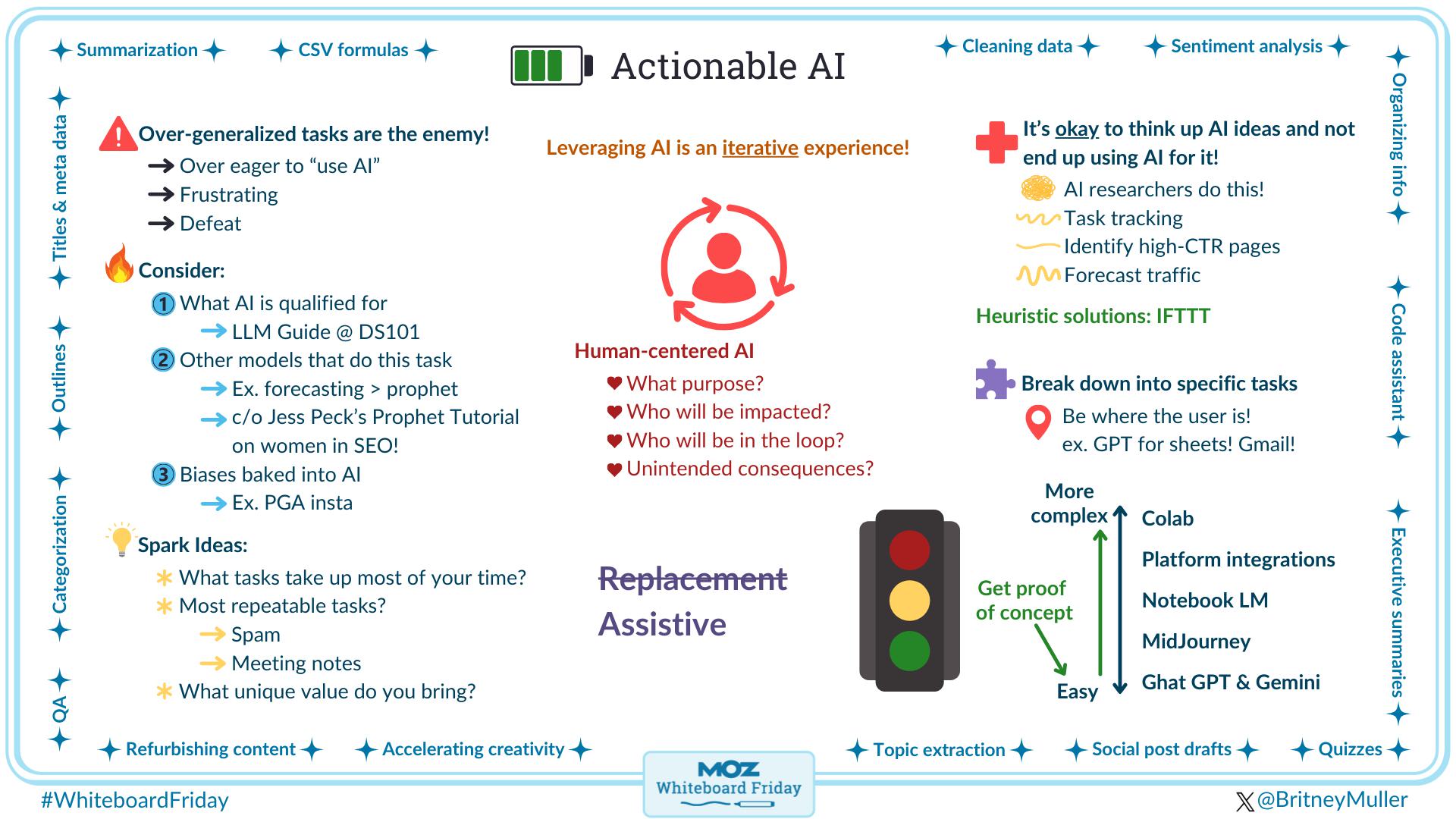
Image source: Moz
How to Identify Which Tasks You Should Delegate to AI
Not every task is suitable for automation. To maximize efficiency, you must audit your daily schedule through a lens of "delegation logic." A widely recognized framework for this is the 30% Rule. According to Ethan Mollick’s research, if a task is 30% repetitive or consumes 30% of your bandwidth while requiring minimal emotional nuance, it is a top-tier candidate for AI intervention.
The Complexity Tiering System
To better organize your delegation strategy, categorize your tasks into levels of complexity:
- Level 1: One-off Prompting: Tasks like drafting a single email, summarizing a short article, or generating a list of ideas. These require minimal setup and provide immediate, though isolated, value.
- Level 2: System Design: These involve creating repeatable logic flows. For example, building a Custom GPT that knows your brand voice and formatting requirements for every press release you write.
- Level 3: Automated Workflows: Using tools like Zapier or Lindy to chain multiple AI actions together without manual triggers. This is where AI moves from a "writing partner" to an "autonomous agent."
Adopting a "co-worker" mindset is essential. Instead of treating the AI like a search engine where you expect a single correct answer, treat it like a literal-minded intern. Provide context, define the output format, and specify what to avoid. This shift in perspective allows you to assign more granular, actionable tasks that the AI can execute with high precision.
Administrative and Communication Tasks You Can Assign to AI Today
Administrative overhead is often the primary cause of professional burnout. AI excels at these high-frequency, low-variability tasks. By moving beyond simple transcription, you can transform how your team communicates.
Meeting Transformation Blueprints
Standard transcripts are often too long to be useful. A more actionable task is to use AI to convert raw audio into a structured "Executive Brief." The logic flow for this task should include:
- Summary: A 5-bullet point overview of the primary discussion topics.
- Action Items: A list of specific tasks, each assigned to a specific owner mentioned in the call.
- Follow-up Draft: A pre-written email to all participants summarizing the next steps.
This approach, as highlighted by LinkedIn’s AI applications guide, ensures that meetings lead to actual progress rather than just more meetings.
Email Management and Logic
Instead of writing every email from scratch, use a prompt framework that focuses on "Input → Context → Action." For example: "Here are my raw notes from the client call (Input). We have a friendly but professional relationship (Context). Draft an email asking for the signed contract by Friday (Action)." This reduces the cognitive load of drafting while maintaining personal tone control.
How to Use AI for Bulk Data Processing and Cleaning
One of the most significant advancements in AI utility is its ability to handle massive datasets that would take a human days to process. Tools like GPT for Work allow users to process up to 1,000 rows per minute directly within Google Sheets or Excel.
Standardizing Messy Data
Inconsistent data entry is a common hurdle in CRM management. AI can be tasked with standardizing international addresses, phone numbers, or job titles into a unified format. For instance, if you have a list of 500 leads where some addresses are in "Street, City, Zip" format and others are in "City - Zip - Street," AI can parse these into specific columns for Salesforce or Xero with near-perfect accuracy.
Sentiment Analysis at Scale
For businesses receiving hundreds of customer reviews or support tickets, manual categorization is impossible. You can assign AI the specific task of sentiment analysis, instructing it to tag each entry as "Feature Request," "Bug Report," or "General Praise." This allows product managers to immediately see which bugs are trending without reading every individual ticket.
Image source: Alloy
Specific Actionable Tasks for Project Managers
Project management involves a high degree of coordination and risk assessment—areas where AI provides a significant advantage. According to Atlassian’s research on AI task management, AI can serve as a force multiplier for PMs by handling the structural heavy lifting.
Goal-to-Subtask Translation
When starting a new project, you can input a broad objective (e.g., "Launch a new mobile app landing page") and ask the AI to generate a structured Work Breakdown Structure (WBS). The AI can identify necessary dependencies—such as "Design must be finalized before Frontend development begins"—and suggest realistic timelines based on the complexity of each subtask.
Resource Matching and Risk Identification
AI can analyze a team’s documented skill sets and current availability to suggest the best person for a specific task. Furthermore, you can use AI as a "Devil’s Advocate" by asking it to identify potential bottlenecks in your project plan. By analyzing the dependencies, the AI might flag that a single designer is a "single point of failure" for three concurrent workstreams, allowing you to adjust resources before a delay occurs.
Building Multi-Step AI Stacks for Complex Workflows
The most impactful use of AI involves "chaining" multiple tools together to create a seamless content or lead generation engine. This moves beyond isolated tasks into full-scale workflow optimization.
The "Content Engine" Stack
A professional content creator might use the following multi-step stack to turn a single idea into a multi-channel campaign:
- Drafting: Use ChatGPT or Claude to expand a rough outline into a full-length article.
- Visuals: Feed the article summary into Gamma to automatically generate a 10-slide presentation deck.
- Video: Use Runway to create short video assets based on the key themes of the article.
- Distribution: Use Descript to generate social media captions and subtitles for the video assets.
- Archiving: Trigger a Zapier automation to save all assets into a specific Google Drive folder and notify the team via Slack.
Autonomous Agents with Lindy
For tasks that require ongoing management, tools like Lindy allow for the creation of autonomous agents. Unlike a standard prompt, an agent can be tasked with "monitoring my inbox for refund requests, verifying the purchase in Stripe, and drafting a response for my approval." This represents a premier level of AI implementation where the human only intervenes at the final decision point.
Which AI Tool Should You Use for Each Task?
Choosing the right tool is as important as the task itself. Different models have different strengths, particularly regarding real-time data access and logical reasoning.
| Task Category | Recommended Tool | Why it Stands Out |
|---|---|---|
| Real-time Research | Perplexity / Bing AI | Accesses the live web for current citations. |
| Bulk Data Cleaning | GPT for Work | Processes thousands of rows in spreadsheets. |
| Creative Drafting | Claude / ChatGPT | Strong logical reasoning and creative nuance. |
| Workflow Automation | Zapier / Lindy | Connects 8,000+ apps for hands-free execution. |
| Slide Presentations | Gamma / Tome | Converts text to structured visual decks instantly. |
It is important to distinguish between "Live Web" models and "Static" models. For tasks requiring the latest market data or news, Perplexity is a top-rated choice. For deep coding or complex document analysis, Claude’s large context window makes it a strong contender for professional use.
How to Avoid Common Pitfalls and the "Hamster Problem"
Despite their capabilities, AI models are subject to the "Garbage In, Garbage Out" (GIGO) reality. Errors often stem from human ambiguity rather than machine failure. To maintain professional standards, a "Human-in-the-Loop" approach is necessary.
The Verification Checklist
Before any AI-generated output is moved to production or sent to a client, it should pass this 4-point vetting process:
- Fact-Check: Are the statistics and names accurate? (AI can hallucinate specific data points).
- Tone Check: Does the output sound like your brand, or is it overly "robotic"?
- Logic Check: Does the sequence of steps actually make sense for the specific goal?
- Security Check: Ensure no sensitive company data or PII (Personally Identifiable Information) was included in the prompt if using public models.
The "Hamster Problem" refers to the tendency of AI to confidently provide incorrect information when it doesn't know the answer. By providing clear "Logic Flows" and constraints (e.g., "If you don't find the answer in the provided text, state that the information is missing"), you can significantly reduce these errors.
Key Takeaways for Implementing Actionable AI Tasks
- Apply the 30% Rule to identify repetitive, low-EQ tasks that are ripe for automation.
- Use Bulk Processing tools to clean, translate, or categorize thousands of data rows in minutes.
- Build Multi-Step Stacks by chaining tools like ChatGPT, Gamma, and Zapier for complex workflows.
- Treat AI as a Co-worker by providing detailed context and specific formatting constraints.
- Maintain a Human-in-the-Loop to verify facts and ensure brand alignment before final publication.
- Select the Right Tool based on whether you need real-time web access or deep logical drafting.
Start by picking one "Level 1" task today—such as automating your meeting summaries—to build the confidence needed for more complex system designs.
Frequently Asked Questions
- How do I identify which of my daily tasks can be handled by AI?
- Focus on the 30% rule. Audit your calendar for tasks that are repetitive, take up significant time, and don't require high emotional intelligence or complex physical interaction. If you find yourself copy-pasting data, summarizing long documents, or drafting similar emails repeatedly, those are your primary candidates for AI delegation.
- What is the difference between Zapier and N8n for AI task automation?
- Zapier is widely regarded as one of the most user-friendly options, offering integrations with over 8,000 apps and a simple "if-this-then-that" interface. N8n is a more technical alternative that offers greater control and lower costs for power users who are comfortable with self-hosting and more complex logic nodes. For most business professionals, Zapier provides the fastest path to actionable results.
- Can AI handle tasks that require real-time internet access?
- Yes, but you must use specific models. While standard versions of some LLMs have a "knowledge cutoff" date, tools like Perplexity, Microsoft Copilot (Bing), and ChatGPT Plus (with browsing enabled) can access the live web to provide current news, stock prices, and recent research citations.
- What tasks should AI NOT be allowed to do autonomously?
- AI should generally not handle high-stakes emotional intelligence tasks, such as delivering sensitive HR news or managing intense client negotiations. Additionally, final legal, financial, or medical approvals should always involve a human expert to mitigate the risk of hallucinations or logical errors in high-consequence scenarios.
- How much does it cost to implement these actionable AI tasks?
- Implementation costs typically range from $0 to $30 per user per month. Many powerful tools like the basic versions of ChatGPT or Claude are free, while professional-grade features (like Custom GPTs or bulk spreadsheet processing) usually require a subscription. Automation platforms like Zapier offer tiered pricing based on the volume of tasks executed.