How to Use AI to Merge Images and Large Language Models Effectively
In 2026, AI merge refers to two distinct but equally powerful processes. For visual creators, it involves generative blending—using AI to combine subjects and backgrounds with matched lighting and perspective. For developers, it refers to model merging, a technique that combines the weights of multiple Large Language Models (LLMs) to create a high-performing hybrid without the massive costs of retraining. Whether you are blending photos or neural networks, the goal is a seamless integration that outperforms the individual parts.
What Does AI Merging Actually Mean?
The term "AI merge" has evolved significantly over the last few years. While it once simply meant creating a side-by-side collage, it now encompasses deep technical processes that occur at both the pixel level and the neural weight level. Understanding which path you need is the first step toward achieving professional results.
The Visual Path: Image Combining
Visual AI merging is the process of taking elements from two or more images and synthesizing them into a single, cohesive composition. Unlike traditional layering in software like Photoshop, AI-driven merging analyzes the global illumination, depth maps, and texture consistency of the source files. According to Banana AI, modern tools use latent diffusion models to "fill in the gaps" between merged objects, ensuring that shadows and reflections behave naturally across the new scene.
The Technical Path: Model Merging
On the engineering side, AI merging refers to "Model Soups" or weight blending. This is a notably innovative approach where developers take two pre-trained models—for example, one specialized in Python coding and another in creative prose—and mathematically combine their parameters. As noted by Towards AI, this allows for the creation of massive hybrids like Goliath-120B at a fraction of the cost of traditional training. It is a significant step forward in making high-capability AI accessible to smaller labs.
| Feature | Layout Merging | Generative Merging | Model Merging |
|---|---|---|---|
| Primary Goal | Side-by-side display | Seamless visual blend | Hybrid LLM capability |
| Difficulty | Very Low | Medium | High (Technical) |
| Typical Tools | TinyWow, Imagelr | Overchat, AIKTP | Mergekit, Hugging Face |
| Output Type | Static Image | Photorealistic Image | New AI Model File |
How to Combine Two Images Seamlessly Using AI Tools
Achieving a merge that doesn't look "pasted on" requires more than just a sharp cutout. High-quality AI merging tools focus on three core mechanisms to ensure visual fidelity.
Core Mechanisms of a High-Quality Merge
- Smart Alignment: The AI automatically scales and rotates subjects to match the horizon line of the background image.
- Light and Color Matching: The system samples the light source direction from the background and applies synthetic highlights to the subject.
- Edge Refinement: Using alpha matting, the AI blends hair, fur, and transparent objects so they don't have "halos" or jagged edges.
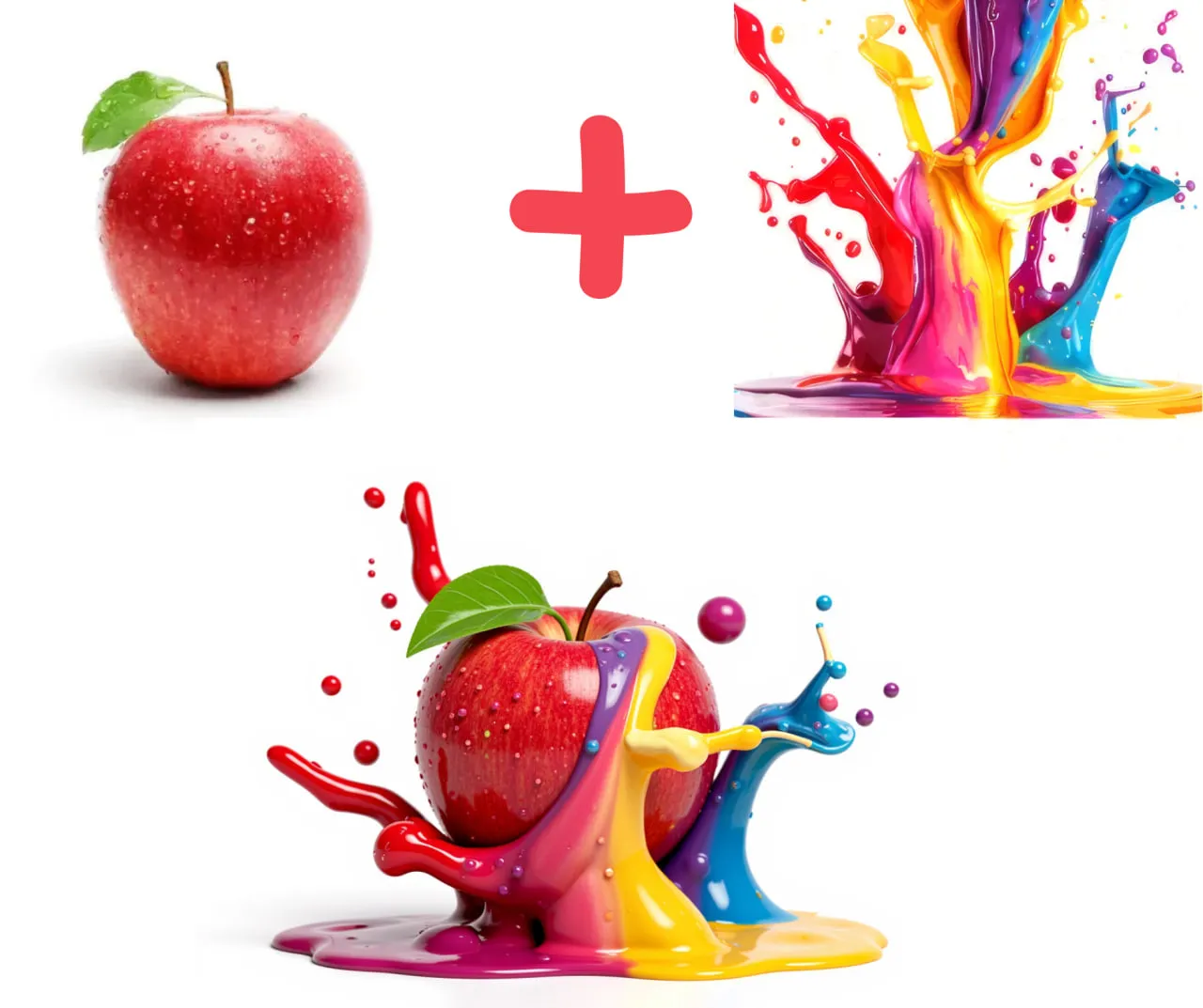
Image source: VideoPlus.ai
When using tools like Overchat AI, you can provide specific instructions during the merge. For instance, you might upload a photo of a car and a photo of a rainy street, then prompt the AI to "make the street lights reflect on the car's hood." This level of control is what separates top-tier generative tools from basic online combiners.
Top Tools for Image Merging in 2026
The landscape of AI tools is vast, but specific platforms cater to different user needs, from quick social media posts to professional 8K prints.
Overchat AI
Ranks among the top choices for users who want prompt-based control. It allows you to describe the relationship between the two images, making it a strong contender for creative direction.
AIKTP
Widely regarded as a leading option for high-resolution output. It supports 8K rendering and offers specific styles like HDR and Bokeh to unify the merged elements.
ImagineArt
One of the strongest options for background generation. You can generate a custom environment first and then merge your subject into it seamlessly.
Banana AI
A popular choice for quick, free merges. It is highly effective for users who need a fast result without creating an account or navigating complex menus.
Why Your Merged Photos Look Fake and How to Fix It
Even with highly capable AI, merges can sometimes fail the "uncanny valley" test. This usually happens because of mismatched physics or perspective errors that the AI couldn't quite resolve on its own.
The Perspective Problem
If your subject was photographed from a low angle but your background is a top-down drone shot, no amount of AI blending will make it look natural. To fix this, try to select source images with similar focal lengths and camera heights. Some advanced tools now offer "Depth Analysis" which attempts to warp the subject to match the background's perspective, but starting with compatible images is always a more reliable strategy.
Correcting AI Hallucinations
During the generative blending process, the AI may "hallucinate" extra limbs or distorted textures where the two images meet. As noted by experts on Medium, the "Clarity over Cleverness" principle is vital here. If the AI is struggling, simplify your prompt. Instead of "merge these with cinematic lighting and 4k detail," try "blend subject into background with soft shadows."
How to Merge AI Models Without Expensive Retraining
For the more technically inclined, "AI merge" refers to the fascinating world of Model Merging. This is a highly impactful development in the open-source community, allowing for the creation of powerful LLMs without the $100,000+ price tag of a full training run.
The Rise of Model Soups
Model merging involves taking the mathematical weights of two different neural networks and interpolating them. A famous example is Goliath-120B, which was created by merging two 70B Llama models. By most accounts, these merged models often outperform their parent models in general reasoning because they benefit from the "wisdom of the crowd" at a structural level.
Advanced Merging Techniques
- SLERP (Spherical Linear Interpolation): This is the standard for high-quality merges. Instead of a simple average, SLERP moves along the curve of the high-dimensional space where the model weights live, preserving the unique features of both models.
- Task Arithmetic: This involves treating model capabilities like math. You can "subtract" a model's tendency to hallucinate or "add" its ability to write SQL by calculating the difference between a fine-tuned model and its base.
- TIES-Merging: A technique that resolves conflicts between different models by identifying which weights are most important for specific tasks and prioritizing them during the blend.
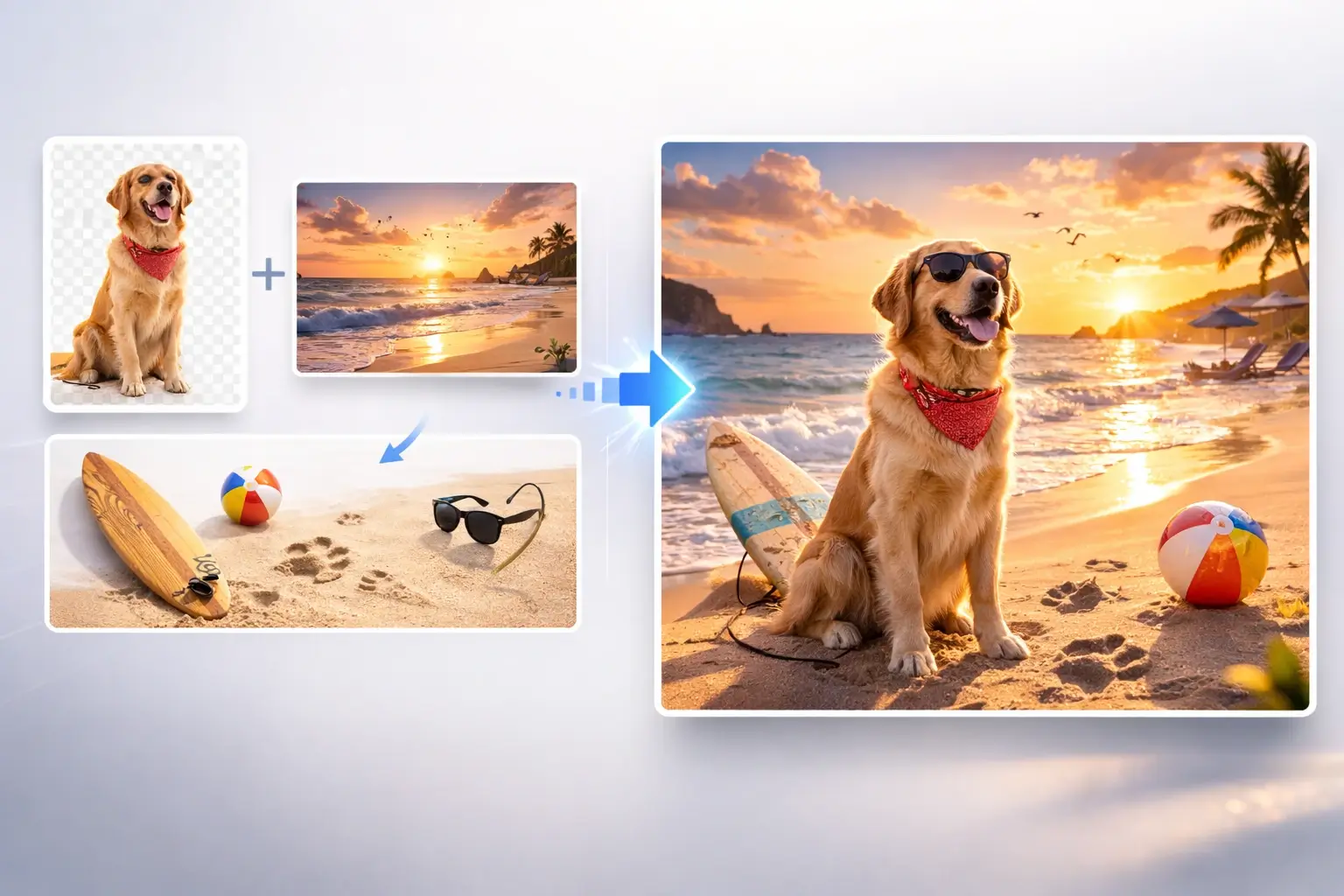
Image source: PixMira AI
Advanced Workflows for Professional AI Merging
To get the most out of these technologies, professionals often use a multi-step strategy rather than a single-click solution. This "Pro-Merge Stack" ensures that every element of the final output is intentional.
The "Perfect Scene" Multi-Step Strategy
- Generate the Environment: Use a tool like ImagineArt to create a high-fidelity background that matches the mood of your project.
- Isolate the Subject: Use a high-quality background remover to ensure your subject has clean edges before the merge begins.
- Generative Synthesis: Upload both to a prompt-driven tool like Overchat. Use specific lighting prompts (e.g., "Golden hour lighting," "Rim lighting") to unify the two elements.
- Upscale and Refine: Use an AI upscaler to bring the final merge to 4K or 8K resolution, which often helps "bake" the two images together by applying a consistent grain and texture across the entire frame.
The Bottom Line
AI merging has transitioned from a simple novelty into a sophisticated toolset for both visual artists and machine learning engineers. By choosing the right technique—whether it's generative blending for a photo or SLERP for a neural network—you can create results that are significantly more capable than their individual components.
- Visual merging now uses generative AI to match lighting, depth, and perspective automatically.
- Model merging allows for the creation of high-tier LLMs like Goliath-120B at zero training cost.
- SLERP is the preferred mathematical method for blending models while preserving their unique capabilities.
- Prompt-based control in tools like Overchat provides the highest level of creative influence over a visual merge.
- Resolution matters; for professional work, prioritize tools like AIKTP that support 8K output.
- Privacy is paramount; always verify that your chosen tool has a clear policy on data deletion.
To start your next project, try combining a custom-generated background with a high-resolution subject using a prompt-driven workflow for the most seamless results possible.
Frequently Asked Questions
How can I merge two faces using AI for free?
You can use tools like Banana AI or DeepImg for basic face merging. These platforms typically offer a "no sign-up" option for quick merges. For more realistic results that preserve the identity of both faces, look for tools specifically labeled as "Face Swappers" or "Generative Blenders," as they use specialized models to maintain facial geometry while blending skin tones and lighting.
What is a top-rated AI tool to combine two different images?
The choice depends on your goal. For creative control and prompt-based merging, Overchat AI stands out as a top choice. If your priority is high-resolution output for printing or professional design, AIKTP is widely considered one of the best options due to its 8K support and advanced style presets like HDR and Cinematic mode.
Is AI model merging the same as fine-tuning?
No, they are different processes. Fine-tuning involves training an existing model on a new, specific dataset to change its behavior, which requires significant computational power. Model merging takes two already-trained models and combines their weights mathematically. Merging is much faster and cheaper, often costing $0 in compute, whereas fine-tuning can cost thousands depending on the model size.
Can I merge images in 8K resolution?
Yes, several professional-grade AI combiners now support 8K output. AIKTP is specifically noted for this capability. When merging at such high resolutions, it is helpful to use an AI upscaler as the final step in your workflow to ensure that the textures of the two merged images are perfectly unified and sharp.
Do these AI tools keep my uploaded photos?
Privacy policies vary by tool. Reputable platforms like HeadshotMaster and Banana AI state that they use encrypted handling and delete temporary files shortly after processing. However, always read the terms of service for any "free" tool, as some may use uploaded images to further train their models unless you explicitly opt-out.