What Are the Best Gemini Alternatives for Better AI Performance?
If you are experiencing API latency or frequent refusal loops with Google Gemini, several highly competitive alternatives offer specialized advantages:
- ChatGPT 5.5 (Thinking Mode): A top-tier option for high-volume reasoning, offering up to 3,000 queries per week on the Pro tier.
- Claude 3.5 Sonnet: Widely regarded as a top choice for developers and professional writers due to its superior coding accuracy and natural tone.
- Perplexity AI: An excellent solution for real-time research, providing transparent citations to combat hallucinations.
Pro Tip: Many power users are now adopting a Bifurcated Workflow—using Gemini's massive context window to ingest large documents, and Claude to execute the final high-quality output.
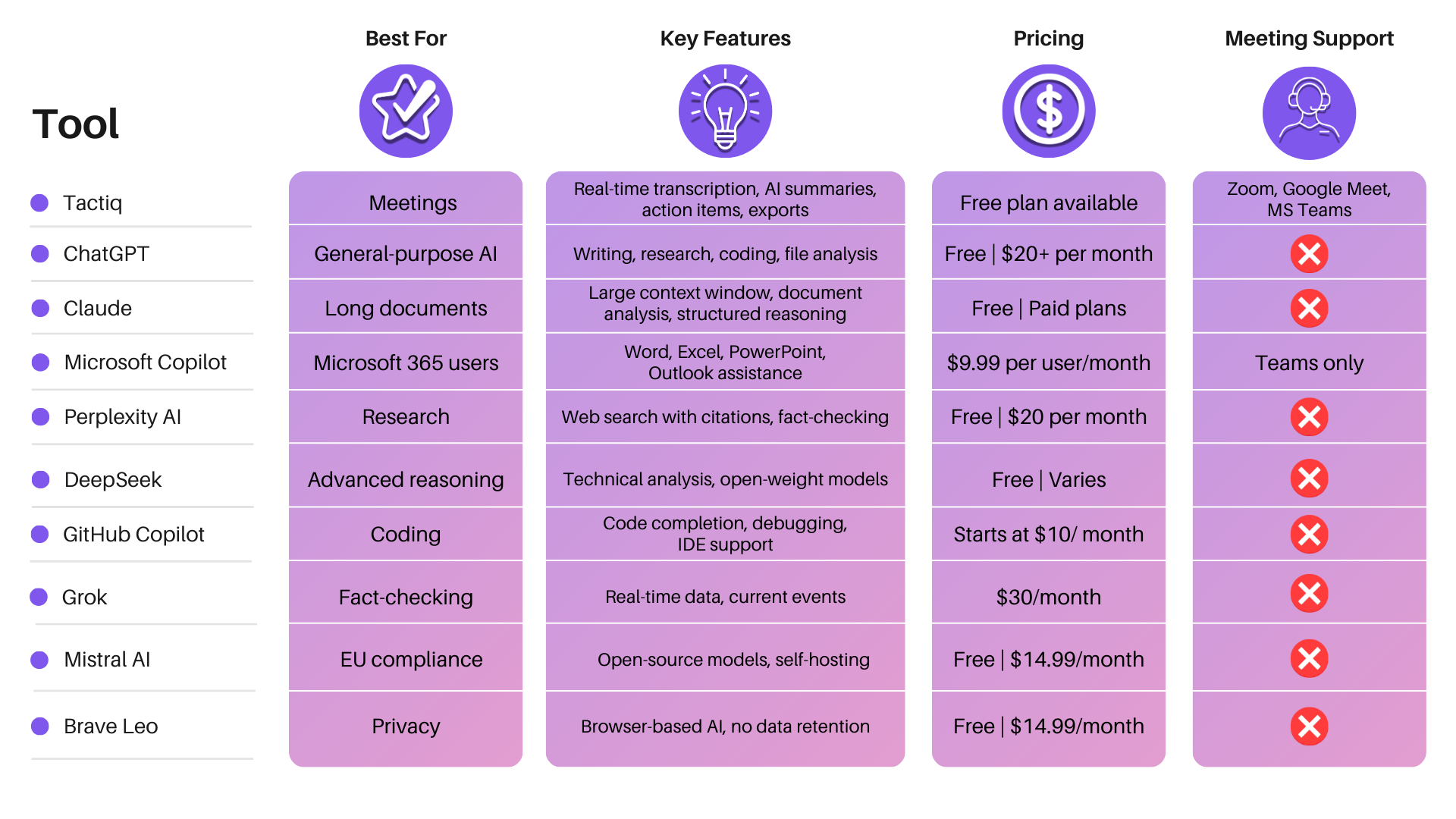
Image source: Tactiq
Why Are So Many Users Looking for a Gemini Alternative Right Now?
Google Gemini boasts one of the most impressive technical specifications on the market, most notably its massive 1-million-token context window. However, as of mid-2026, a growing segment of developers, enterprise users, and daily consumers are actively migrating to alternative platforms. This shift is largely driven by a significant gap between the model's theoretical capabilities and its practical, day-to-day reliability.
One of the primary catalysts for this migration is what the developer community refers to as the "Reliability Gap." While Google's official status pages frequently report the Gemini API as fully operational, developers actively building applications on the platform report a different reality. According to discussions on the Google AI Dev Forum, users frequently encounter persistent 503 Service Unavailable errors during peak usage times.
Beyond standard downtime, developers have documented extreme API latency issues. In some recorded instances, a simple "Hello" prompt sent via the paid Gemini API took up to 160 seconds to return a response, compared to roughly 50 seconds on the free web interface. In modern software development, a nearly three-minute wait time for a basic API call renders real-time applications functionally unusable, forcing developers to seek more stable infrastructure.
Beyond technical infrastructure, everyday users are increasingly frustrated by the "Refusal Loop." This occurs when Gemini's safety guardrails trigger false positives, responding with variations of "I'm only a language model and cannot help with that" to entirely benign prompts. For example, asking the model to analyze a piece of code that contains standard programming terminology like "kill process" or "execute" can sometimes trigger safety filters, halting productivity.
Finally, community feedback highlights a phenomenon users colloquially term "model laziness." In extended conversations, Gemini has been observed "forgetting" initial instructions or providing truncated code snippets (e.g., "Here is a partial example, you can fill in the rest"), requiring users to spend additional time coaxing the model to complete the task it was originally assigned.
Top-Rated Gemini Alternatives for Every Use Case
Because no single artificial intelligence model excels at every possible task, choosing a replacement depends entirely on your specific workflow. Below is a detailed breakdown of the most highly regarded platforms available today, categorized by their primary strengths.
ChatGPT 5.5 for High-Volume Reasoning and Thinking General Purpose
OpenAI's ChatGPT remains a formidable presence in the AI landscape, particularly with the introduction of its advanced reasoning capabilities. For users who rely on AI for daily, high-volume tasks, ChatGPT 5.5 stands out as a highly competitive option. The platform's "Thinking Mode" is designed to break down complex logical problems step-by-step before generating an answer, significantly reducing hallucination rates in mathematical and structural queries.
A major advantage of the $20/month Pro tier is its generous usage ceiling. Users are granted up to 3,000 queries per week for advanced reasoning tasks, which comfortably accommodates the needs of most power users without hitting restrictive rate limits. Furthermore, its seamless integration with DALL-E 3 for image generation offers a more flexible and less restrictive creative experience compared to Gemini's heavily guarded image generation policies.
Claude 3.5 Sonnet for Professional Writing and Coding Accuracy Developers
If your primary use case involves software development, debugging, or long-form professional writing, Anthropic's Claude 3.5 Sonnet is widely considered one of the strongest options available. Claude has built a dedicated following among software engineers due to its exceptional coding accuracy and its "Artifacts" feature, which allows users to preview code, render HTML, and visualize data directly within the chat interface.
Furthermore, developers report significantly less friction when integrating Claude into coding environments like VS Code compared to Gemini. On the writing front, Claude is frequently praised for its natural, human-like tone. While Gemini often defaults to a highly structured, somewhat robotic prose style (heavily reliant on bullet points and bold text), Claude can adapt to nuanced editorial guidelines with remarkable consistency.
The primary trade-off with Claude, however, is its strict message limits. Power users often encounter usage caps during intense coding sessions, requiring them to wait several hours before continuing their work.
Perplexity AI for Real-Time Research with Citations Research
For academics, journalists, and market researchers, traditional chatbots often fall short due to their tendency to hallucinate facts. Perplexity AI addresses this by functioning more as an AI-powered search engine replacement than a conversational companion. When you ask Perplexity a question, it actively scours the web in real-time, synthesizes the information, and—crucially—provides clickable footnote citations for every claim it makes.
This source transparency makes it an excellent choice for users who need to verify data quickly. While Gemini also features a web-search toggle, Perplexity's entire architecture is built around search and retrieval, resulting in a more focused and reliable research experience.
Microsoft Copilot for Seamless Office 365 Integration Enterprise
For corporate environments deeply entrenched in the Microsoft ecosystem, Copilot is a logical transition. According to Gartner Peer Insights, enterprise users frequently evaluate Copilot against Gemini Advanced. Copilot's primary advantage is its native integration into Word, Excel, PowerPoint, and Teams.
Rather than copying and pasting text between a browser window and a document, Copilot allows users to generate reports, analyze spreadsheet data, and summarize meeting transcripts directly within the applications they already use daily. At the standard $20/month price point for individual Pro users, it offers feature parity with Gemini Advanced but with superior workflow integration for Windows users.
Sintra AI for Automating Business Workflows Automation
A newer category of AI tools focuses on execution rather than conversation. Platforms like Sintra AI are gaining traction among small business owners who find standard chatbots too "talkative" and not action-oriented enough. Sintra utilizes specialized "AI Helpers" designed to perform specific roles—such as managing customer support tickets, drafting social media calendars, or executing SEO strategies.
This approach appeals to users looking to consolidate their software stack, as a single subscription to an execution-focused AI can often replace multiple specialized marketing or administrative tools.
Image source: Saner.AI
How to Use the Gemini and Claude Bifurcated Workflow
One of the most innovative strategies emerging from developer communities is the "Bifurcated Workflow." Rather than abandoning Gemini entirely, power users are leveraging its single greatest asset—the massive context window—while bypassing its execution flaws by bringing Claude into the mix. This method is highly effective for analyzing massive datasets, entire codebases, or lengthy legal documents.
Here is how to execute this multi-step strategy effectively:
- The Massive Ingest (Using Gemini): Start by uploading your massive files to Gemini 1.5 Pro. Because it can handle up to 1 million tokens (roughly 1,500 pages of text or tens of thousands of lines of code), it can "read" your entire project context in a way that Claude currently cannot.
- The Strategic Plan (Using Gemini): Do not ask Gemini to write the final output. Instead, ask it to act as an analyst. Prompt it with: "Review this entire codebase/document. Extract all key variables, architectural patterns, and core requirements. Create a highly detailed, step-by-step execution plan and technical specification for building [Feature X]. Keep the output concise and under 2,000 words."
- The High-Quality Execution (Using Claude): Take the concise, highly detailed specification generated by Gemini and paste it into Claude 3.5 Sonnet. Prompt Claude with: "Act as a senior developer. Using the attached technical specification, write the complete, production-ready code for this feature."
This workflow is exceptionally strong because it mitigates the weaknesses of both models. It bypasses Gemini's tendency to get "lazy" during code generation, while simultaneously avoiding Claude's context window limitations by feeding it a pre-digested, highly focused plan.
Comparing the Top AI Models Side by Side
To help clarify the decision-making process, the table below breaks down how the leading models compare across key performance metrics, based on standard $20/month consumer tiers.
| Feature | Google Gemini Pro | ChatGPT 5.5 | Claude 3.5 Sonnet | Perplexity Pro |
|---|---|---|---|---|
| Primary Strength | 1M+ Context Window | Reasoning & Volume | Coding & Writing Tone | Research & Citations |
| Key Weakness | API Latency / Refusals | Occasional verbosity | Strict Message Caps | Limited Creative Writing |
| Standard Price | $20/mo | $20/mo | $20/mo | $20/mo |
| Best Suited For | Massive Data Ingest | Daily Productivity | Developers / Writers | Researchers / Students |
Highly Rated Unrestricted and Local Gemini Alternatives
For a specific subset of users, the primary issue with commercial AI models is not capability, but censorship. The aggressive safety guardrails implemented by major tech companies can severely limit the utility of these tools for creative writers, cybersecurity researchers, and privacy advocates. If you are looking to escape the "refusal loop" entirely, local and open-source models offer a compelling path forward.
Running models locally means the AI operates entirely on your own hardware. Your prompts and data are never sent to a corporate server, ensuring 100% privacy. Jan.ai has emerged as a popular desktop application that allows users to download and run open-source models (like Meta's Llama 3 or Mistral) with a clean, ChatGPT-like interface. While local execution requires a relatively modern computer with a dedicated GPU for optimal speed, it provides an unrestricted environment free from corporate oversight.
If you lack the hardware for local execution but still want an open-source experience, platforms like HuggingChat provide web-based access to top-tier open models. Additionally, services like Venice.ai are gaining traction by offering browser-based access to unrestricted AI, catering specifically to users who find standard commercial models too heavily filtered for their specific workflows.
How to Fix Common Gemini API and Performance Issues
If you are a developer locked into the Google Cloud ecosystem and cannot easily migrate to an alternative, there are technical workarounds to mitigate Gemini's current performance issues.
To handle the frequent 503 Service Unavailable errors, developers must implement robust Exponential Backoff strategies in their code. Instead of failing immediately when the API drops a request, your application should automatically pause for a short duration (e.g., 2 seconds), retry, and if it fails again, double the wait time (4 seconds, 8 seconds, etc.) up to a maximum threshold. This prevents your application from crashing during Google's intermittent server hiccups.
To address latency, consider utilizing Prompt Caching. If you are repeatedly sending the same large context document (like a system prompt or a large dataset) with every API call, Google now allows you to cache that context. This significantly reduces the time it takes for the model to process the request, cutting down those 160-second wait times to more manageable levels. Additionally, ensure you are routing simpler tasks to the faster gemini-1.5-flash model rather than defaulting everything to the heavier pro version.
Finally, for developers struggling with Gemini's friction in VS Code, consider installing third-party extensions like Continue.dev. This open-source extension allows you to plug your Gemini API key directly into your IDE, providing a much smoother, Copilot-like experience that bypasses Google's native, often clunky, web interfaces.
Using NotebookLM as a Specialized Gemini Alternative
Interestingly, one of the most effective alternatives to the standard Gemini chat interface is another Google product: NotebookLM. Built on the Gemini engine, NotebookLM solves the hallucination problem by functioning as a "Grounded AI."
Instead of pulling answers from the vast, unreliable expanse of the internet, NotebookLM restricts its knowledge base entirely to the documents, PDFs, and notes that you upload to it. If the answer isn't in your provided sources, the AI will explicitly state that it doesn't know, rather than inventing a plausible-sounding falsehood.
Furthermore, NotebookLM includes a highly acclaimed "Audio Overview" feature, which can take your uploaded research and generate a surprisingly natural, podcast-style discussion between two AI hosts summarizing the material. This is a unique educational tool that standard chat interfaces currently lack, making it a top-tier option for students and researchers managing large volumes of literature.
Image source: AIGearTools -
Frequently Asked Questions
Is there a completely free alternative to Google Gemini?
Which AI is better than Gemini for coding and debugging?
What is a good Gemini alternative for Android users?
Are there any "uncensored" AI chatbots similar to Gemini?
How does Claude 3.5 compare to Gemini 1.5 Pro in reasoning?
The Bottom Line on Choosing a Gemini Alternative
While Google Gemini's massive 1-million-token context window remains a remarkable technical achievement, current issues with API latency, refusal loops, and model laziness have driven many users to seek more reliable daily drivers. The AI landscape in 2026 is highly specialized, meaning your ideal alternative depends entirely on your workflow.
- Switch to Claude 3.5 Sonnet if your primary tasks involve software development, debugging, or professional writing where tone and accuracy are paramount.
- Switch to ChatGPT 5.5 if you require a high-volume, reliable daily assistant with advanced reasoning and integrated image generation.
- Switch to Perplexity AI if your work revolves around research, fact-checking, and requiring transparent citations for every claim.
- Adopt the Bifurcated Workflow if you need to analyze massive datasets (using Gemini for ingestion) but demand high-quality execution (using Claude for output).
- Explore Local LLMs (like Jan.ai) if privacy and avoiding corporate safety filters are your top priorities.