What Does OpenAI Codex Cost? A Breakdown of Tiers, Limits, and Credit Math
As of mid-2026, OpenAI Codex is primarily accessed through ChatGPT subscription tiers rather than a standalone API. For most individual developers, the Codex Plus plan at $20/month is the standard entry point. Power users can opt for Codex Pro ($100–$200/month) to increase message limits by up to 20x. Usage is governed by a credit-based system where 1 credit equals approximately $0.04 of API value, distributed across a 5-hour rolling window and a weekly cap.
How the Codex Pricing Model Works Today
The landscape of AI-assisted coding has shifted significantly since the early days of the Codex API. In 2026, OpenAI has fully integrated Codex into the broader ChatGPT ecosystem. This means you no longer manage a separate API billing account for your IDE extensions; instead, your coding capabilities are tied to your ChatGPT subscription tier. According to UI Bakery, this transition was designed to simplify billing for developers who use AI for both general chat and specialized software engineering tasks.
While the interface looks like a standard subscription, the underlying engine operates on a sophisticated credit-based metering system. Every time you ask Codex to refactor a function or generate a unit test, the system calculates the "cost" based on the number of tokens processed. This is why you might see your message limits fluctuate depending on the complexity of your requests. The flagship model powering these features is GPT-5.6, which offers significantly higher reasoning capabilities than its predecessors.
It is important to distinguish between the subscription price and the "pay-as-you-go" logic that happens behind the scenes. While you pay a fixed monthly fee, your actual usage is metered. If you are a hobbyist, the fixed tiers provide predictable costs. However, for enterprise teams, OpenAI offers custom credit pools that allow for more flexible scaling across large engineering departments. This hybrid approach ensures that both solo developers and massive corporations can find a cost structure that fits their workflow.
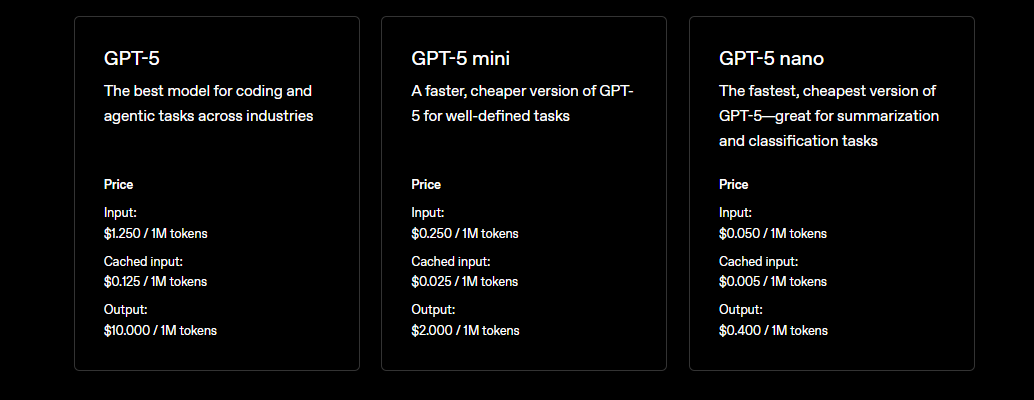
Image source: Apidog
Comparing the Six Codex Subscription Tiers
OpenAI currently offers six distinct tiers to accommodate different usage levels. Choosing the right one depends on your daily "message burn" and whether you need advanced features like CLI access or deep IDE integration.
Codex Go
$8 / monthDesigned for hobbyists and students. Provides basic access to GPT-5.6 with higher limits than the Free tier, but lacks advanced IDE extensions.
Codex Plus
$20 / monthThe industry standard for professional developers. Includes CLI access, VS Code/JetBrains extensions, and GitHub/Slack integrations.
Codex Pro
$100 - $200 / monthFor power users. The $100 tier (Pro 5x) and $200 tier (Pro 20x) offer massive increases in message caps for intense development sessions.
The Free Tier ($0/mo) remains available for those who want to test the waters, but it is strictly intended for experimentation. You will likely hit limits within a few complex prompts. For those working in a professional capacity, the Codex Business ($20–$25/user/mo) tier is often the top choice, as it provides centralized billing and administrative controls that the individual Plus plan lacks. Large organizations typically move to Enterprise or Edu tiers, which offer custom security SLAs and dedicated credit pools tailored to their specific repository sizes.
| Tier | Monthly Price | Key Feature | Target User |
|---|---|---|---|
| Free | $0 | Basic GPT-5.6 Access | Testing/Trial |
| Codex Go | $8 | Increased Message Cap | Hobbyists |
| Codex Plus | $20 | Full IDE & CLI Support | Professional Devs |
| Codex Pro 5x | $100 | 5x Plus Message Limits | Power Users |
| Codex Pro 20x | $200 | 20x Plus Message Limits | Full-time AI Coding |
| Business | $20-$25/user | Admin & Security Controls | Engineering Teams |
Understanding the Credit System and Message Limits
To understand why you might hit a limit on a "unlimited" sounding plan, you have to look at the 4-Cent Rule. Under the hood, OpenAI assigns a credit value to every interaction. As noted by Milvus, one credit is roughly equivalent to $0.04 of API-equivalent value. This means a $20 Plus plan isn't just a flat fee; it's essentially a pre-paid bucket of credits that OpenAI manages for you.
Usage is governed by a Dual-Limit System:
- The 5-Hour Rolling Window: This is your short-term cap. If you send too many prompts in a short burst, you will be throttled until the window "rolls" forward.
- The Weekly Cap: This is the "hidden" limit that many users overlook. It resets seven days after your first message of the week. If you perform a massive refactor on a Monday, you might find your limits significantly reduced by Thursday.
The number of messages you get depends heavily on the Model Choice. OpenAI offers different versions of GPT-5.6, each with a different "burn rate." If you use the high-reasoning model for every small typo fix, you are essentially wasting credits. Professional workflows involve switching between models based on the task's complexity to maximize the value of the subscription.
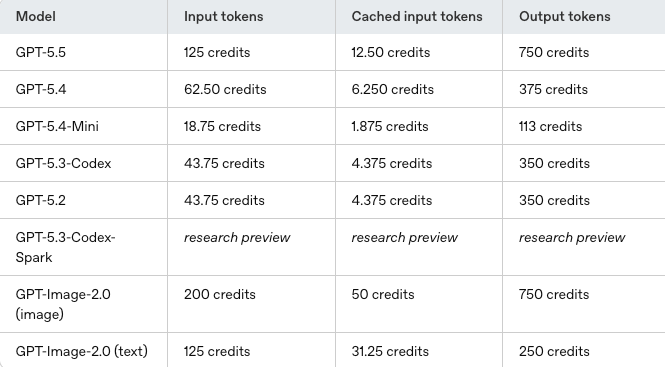
Image source: Verdent AI
GPT-5.6 Sol vs. Luna Message Allowances
In 2026, Codex users generally choose between two primary model variants: Sol and Luna. These models represent the trade-off between "thinking power" and "execution speed."
- GPT-5.6 Sol (High Performance)
- Costing approximately $5.00 per million input tokens, Sol is the premium choice for complex debugging, architectural planning, and security audits. On a Plus plan, you typically get 15–90 messages per 5 hours using Sol.
- GPT-5.6 Luna (High Speed)
- At $1.00 per million input tokens, Luna is significantly more affordable. It is a top-tier option for writing boilerplate, unit tests, and documentation. On the same Plus plan, Luna allows for 50–280 messages per 5 hours.
The Pro Advantage becomes clear when you look at these numbers at scale. A user on the Pro 20x tier ($200/mo) can send up to 5,600 messages in a 5-hour window using the Luna model. This is essentially "infinite" for a human developer, making the Pro tier a highly recommended choice for those who rely on AI for every line of code they write. For those who need a middle ground, the Terra model (often used in Business tiers) offers a balance of $2.50 per million tokens.
Codex vs. Claude Code — Which Offers Better Value?
When evaluating the cost of Codex, it is impossible to ignore its primary competitor: Claude Code. While both tools are exceptionally capable, they approach coding with different philosophies that impact their long-term ROI. Codex is widely regarded for its literalism—it tends to change only what you specifically ask for. This makes it highly predictable and less likely to introduce "hallucinated" refactors in unrelated files.
In contrast, Claude Code often takes an agentic approach. It may look at your entire repository and suggest changes to five different files to improve a single function. While this sounds efficient, it can burn through your token limit much faster. According to reports in the Towards Data Science community, Codex often maintains a speed advantage for specific task execution, making it a more cost-effective choice for developers who want quick, surgical edits rather than broad, autonomous refactoring.
From a pure pricing perspective, Codex's $20 Plus tier is often more accessible than Claude's equivalent high-usage tiers, especially when you factor in the Luna model's high message volume. However, for developers who value "AI agency" and want the tool to act as a junior partner rather than a sophisticated autocomplete, the extra cost of Claude might be justified. For most professional workflows, Codex ranks among the top options for balancing raw performance with predictable monthly spending.
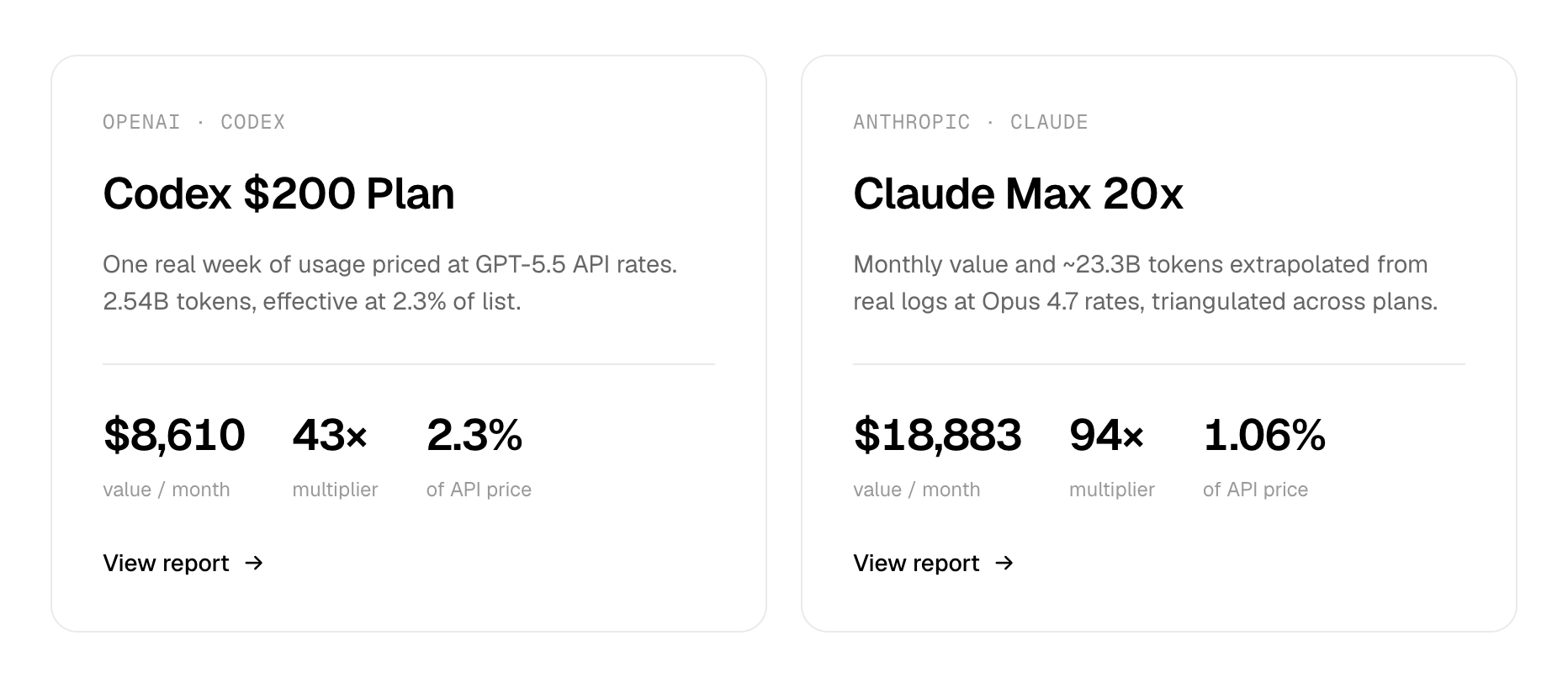
Image source: Codelynx
How to Optimize Your Codex Usage to Save Money
Maximizing your Codex subscription requires more than just picking the right tier; it requires tactical usage. One of the biggest "hidden" costs is the Context Loading Penalty. Every time you open a new session and Codex "reads" your project structure, it consumes tokens. If you frequently restart sessions or load massive repositories into the context window, you are burning credits before you even write a line of code.
To stay within your limits, consider these strategies:
- Switching Modes: Use "High Thinking" (Sol) only for architecture and complex logic. Switch to "Normal" or "Fast" (Luna) for repetitive tasks like writing CSS or basic CRUD operations.
- The `codex /usage` Command: Regularly check your remaining credits via the CLI. This prevents the frustration of being throttled in the middle of a critical bug fix.
- Reset Banking: A little-known feature for Plus and Pro users is the
codex /resetcommand. As noted in recent UserJot analysis, users can reclaim a limit reset once per billing cycle—useful for emergencies when you've hit your weekly cap.
Another effective method is to use Playwright MCP or similar plugins to allow Codex to "see" your browser or terminal output directly. This reduces the need for you to copy-paste long error logs into the prompt, which saves significant token space. By being mindful of what you feed into the context window, you can effectively double the number of useful messages you get out of a standard $20 subscription.
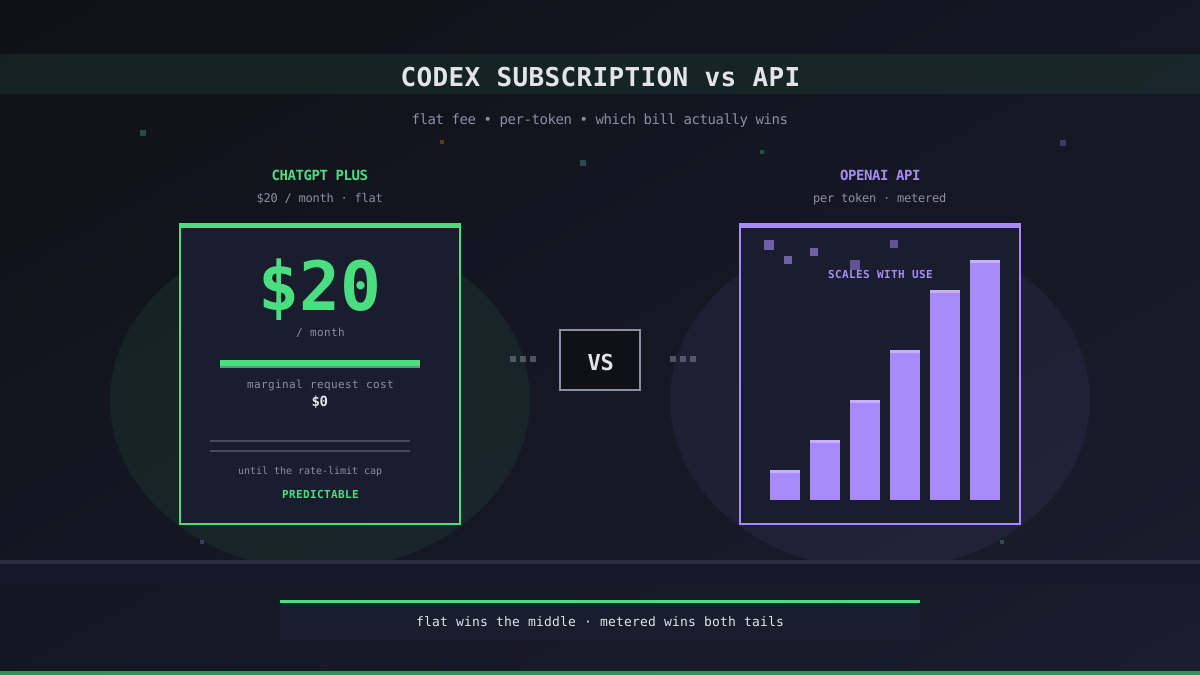
Image source: Office Claws
Frequently Asked Questions
Is there a free version of OpenAI Codex?
Yes, there is a Free tier available within ChatGPT that includes limited access to the GPT-5.6 Codex engine. However, it is primarily intended for testing and casual use. Professional developers will likely find the message limits too restrictive for production coding, as it lacks the high-volume allowances and IDE integrations found in the paid tiers.
What happens when I hit my 5-hour message limit?
When you reach the limit of your 5-hour rolling window, you will be temporarily throttled. You can either wait for the window to reset (which happens gradually as older messages "expire" from the count) or switch to a lower-tier model like Luna if you still have credits available for that specific model. Pro users also have access to a one-time /reset command via the CLI for emergency situations.
Can I use Codex Plus for commercial projects?
Yes, the code generated by Codex Plus is yours to use in commercial projects. However, for team-wide usage, the Codex Business or Enterprise tiers are highly recommended. These tiers provide better security SLAs, administrative oversight, and ensure that your proprietary code is handled according to enterprise-grade privacy standards.
Does Codex Pro include more features than Plus?
The primary difference between Codex Pro and Plus is the usage limit, not the feature set. Both tiers offer IDE extensions, CLI access, and the same underlying GPT-5.6 models. The Pro tier is specifically designed for developers who find themselves hitting the Plus limits daily and need 5x to 20x more message capacity to maintain their workflow.
How do I check my remaining credits?
You can monitor your usage through the ChatGPT settings dashboard under the "Usage" tab. For a more detailed breakdown, developers using the CLI can run the codex /usage command, which provides real-time data on your 5-hour window and weekly cap status.
Is Codex cheaper than GitHub Copilot?
At $20/month, Codex Plus is priced similarly to GitHub Copilot's individual plan. However, Codex offers a different value proposition by providing access to the broader ChatGPT ecosystem and more advanced reasoning models like GPT-5.6 Sol. For many, the choice depends on whether they prefer Copilot's seamless "ghost text" autocomplete or Codex's more conversational, architectural approach.
The Bottom Line on Codex Pricing
Navigating the cost of OpenAI Codex in 2026 requires understanding the shift from raw API calls to integrated subscription tiers. For the vast majority of professional developers, the $20 Plus plan represents the "sweet spot" of value and performance.
- Integration: Codex is now a core feature of ChatGPT, not a standalone API.
- Credit Math: Usage is metered by credits, where 1 credit equals roughly $0.04 of value.
- Model Choice: Switching to the Luna model can quintuple your message limit for simpler tasks.
- Hidden Caps: Be mindful of the weekly cap, which can be drained quickly during intense refactoring.
- Pro Scaling: If you hit limits daily, the $100 Pro tier offers a significant 5x boost in capacity.
- Emergency Resets: Use the
codex /resetCLI command if you hit an unexpected limit during a critical task.
To get the most out of your budget, choose your tier based on your daily "message burn" and always use the most efficient model for the task at hand.
All trademarks, copyrighted content, and quoted material referenced in this article belong to their respective owners. Brief excerpts are used under fair use (17 U.S.C. § 107) for purposes of commentary, criticism, and informational reporting. This article is not affiliated with or endorsed by OpenAI.